
Configuring HP Integrated Lights-Out 3 with Microsoft Active Directory HOWTO

9
• Kerberos realm
• Kerberos KDC (Key Distribution Center) server address
• Kerberos KDC server port
• Kerberos keytab
• Directory groups
• iLO date/time, SNTP settings
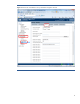
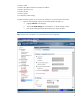
Complete the following steps to use the iLO web interface to set up the Kerberos host name.
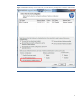
1. Open the iLO web page and click on the Administration tab (Figure 7):
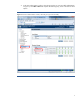
a. Highlight Network in the left pane.
b. Select the IP & NIC Settings tab in the Network – IP & NIC Settings window.
c. Enter the iLO Subsystem Name (Host Name) in the space provided.
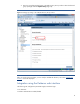
Figure 7: Use the iLO web interface to set up the Kerberos host name configuration.