
Configuring HP Integrated Lights-Out 3 with Microsoft Active Directory HOWTO

8
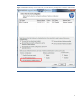
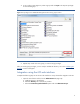
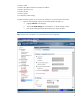
3. Enter the group distinguished name in the Edit Directory Group window. Select the desired
group privileges and click Update Group (Figure 6).
Figure 6: Modify group settings in the Add/Edit Directory Group window.
After you set the group privileges, you are ready to validate the directory. Go to the “Validating the
directory
” section of this paper.
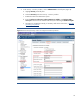
Integration using the Kerberos web interface
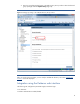
The following iLO configuration parameters apply to Kerberos login:
• iLO hostname
• Kerberos authentication enable/disable