
Configuring HP Integrated Lights-Out 3 with Microsoft Active Directory HOWTO

5
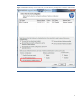
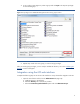
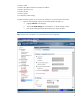
4. A new window opens (Figure 3). Select a group and click Open. This step sets privileges
for the selected group.
Figure 3: Set privileges in the HPQLOMIG distinguished name security groups window.
5. Repeat steps 3 and 4 for each group you want to assign privileges.
After you set the group privileges, you are ready to validate the directory. Go to the “
Validating the
directory” section of this paper.
Integration using the iLO web interface
Complete the following steps to use the iLO web interface to set up schema-free integration with AD.
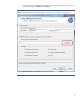
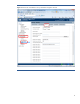
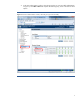
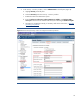
1. Open the iLO software and click on the Administration tab (Figure 4):
a. Highlight Security in the left pane.
b. Select the Directory tab in the Security window.
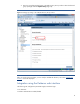
c. Select the Use Directory Default Schema option and click Administer Groups.