Configuring HP Integrated Lights-Out 3 with Microsoft Active Directory HOWTO
Manuals
Brands
HP Manuals
Computer Accessories
HP Integrated Lights-Out 3 (iLO 3) Firmware for ProLiant G7 Servers
1
2
3
4
5
6
7
8
9
10
4
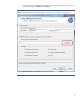
3.
Go to the Co
nfigure Manag
ement Proc
essors window t
o browse the di
rectory fo
r security
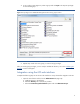
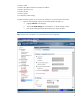
groups (Figure 2).
Click
Brows
e
and then
Next
.
Figure 2:
Use the
HPQLOMIG Configure Manag
ement P
rocessor window
to browse for s
ecurit
y groups.
1
...
2
3
4
5
6
...
...
33