
Configuring HP Integrated Lights-Out 3 with Microsoft Active Directory HOWTO




32
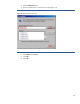
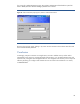
If a prompt for credentials appears (Figure 26), Kerberos authentication failed and the system fell
back to NTLM (Windows NT LAN manager) authentication instead.
Figure 26: If the Credentials prompt appears, Kerberos authentication failed.
Browse to the iLO login page, and log in by name. Use the username in the Kerberos SPN form and
the associated domain password.
Conclusion
Increasingly, enterprise customers are using directory services to address security and to reduce
management costs. Using your existing Microsoft Active Directory, you can authenticate access and
authorize user privileges to iLO management devices. This integration with directory services improves
efficiency by letting you configure and maintain the user accounts for the iLO devices in a central,
scalable database.