Configuring HP Integrated Lights-Out 3 with Microsoft Active Directory HOWTO
Manuals
Brands
HP Manuals
Computer Accessories
HP Integrated Lights-Out 3 (iLO 3) Firmware for ProLiant G7 Servers
24
25
26
27
28
29
30
31
32
33
31
5.
Browse to the iLO
interfac
e using the fully qu
alified d
omain name.
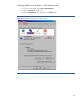
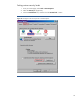
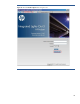
6.
Browse to the iLO
login page, and clic
k the
HP Zero S
ign
In
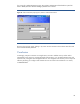
button (Figure 25).
Figur
e 25:
Click t
he
HP Z
ero S
ig
n In
button
to
logon to iLO
.
1
...
...
29
30
31
32
33