Configuring HP Integrated Lights-Out 3 with Microsoft Active Directory HOWTO
Manuals
Brands
HP Manuals
Computer Accessories
HP Integrated Lights-Out 3 (iLO 3) Firmware for ProLiant G7 Servers
21
22
23
24
25
26
27
28
29
30
26
4.
Click the
Advanced
button.
5.
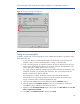
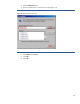
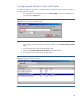
Enter the website name in the text box provided (Figure 19).
Figur
e 19:
Add website to the zone.
6.
Click
Add
and then
Close
.
7.
Click
OK
.
8.
Click
OK
.
1
...
...
24
25
26
27
28
...
...
33