
Configuring HP Integrated Lights-Out 3 with Microsoft Active Directory HOWTO


24
Configuring the Kerberos client with Internet Explorer
To log into iLO, you must be a member of a group with assigned permissions. For Windows clients,
locking and unlocking the workstation will refresh the login credentials for iLO. Home versions of
Windows operating systems do not support Kerberos.
To enable single sign-on with Internet Explorer (IE), complete the sequence of steps in the following
sections.
Enabling authentication in Internet Explorer
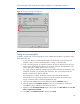
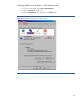
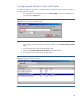
1. From your Home page, select Tools > Internet Options (Figure17).
2. Select the Advanced tab.
3. Scroll to Security.
4. Verify that Enable Integrated Windows Authentication is checked.
5. Click OK.
Figure 17: Enable integrated Windows authentication in Internet Explorer.