
Configuring HP Integrated Lights-Out 3 with Microsoft Active Directory HOWTO


22
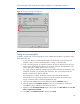
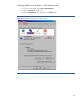
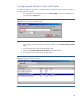
If AD authentication fails, check the event log for an LDAP error, as illustrated in Figure 16.
Figure 16: Check the event log for an LDAP error.
Testing for a non-working SSL
A domain controller with a non-working SSL can cause authentication problems in its domain. Follow
these steps to test SSL:
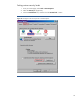
1. To see which domain controller handles requests for the domain, open a browser and
navigate to https://<Domain Controller>:636 or to https://<domain>:636.
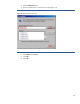
2. If SSL is operating properly on a domain controller, the Security dialog box will ask if you
want to access the site and will offer to view the server certificate. The appearance of the
Security dialog box indicates that the server is working.
If a “page cannot be displayed” message appears instead of the Security dialog box, then
the domain controller is not accepting SSL connections. This is most likely because the
domain controller doesn’t have a certificate.
If auto-enrollment is enabled, the domain controller issues and installs certificates
automatically, but a reboot may be required. To avoid a possible reboot and to force
issuing a certificate, perform the following additional steps:
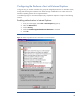
3. Open Microsoft Management Console (MMC) and add the Certificates snap-in.
4. When prompted, select Computer Account for the type of certificates you want to view.
Click OK to continue, and return to the Certificates snap-in.
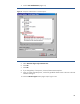
5. Right-click on the Personal/Certificates folder. On the right, click More Actions, and then All
Tasks > Request New Certificate.
6. Click Next, select Domain Controller, and then click Enroll.