
Configuring HP Integrated Lights-Out 3 with Microsoft Active Directory HOWTO

20
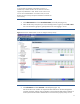
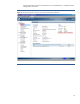
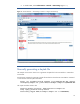
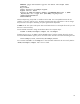
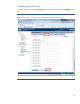
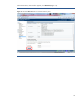
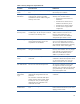
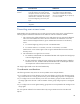
Test name Successful result Failed result
Directory User
Context
The test passes when a user login succeeds
using the directory user context. The test
also passes when iLO can find the context
container object in the directory using the
administrator’s credentials. You can only
test contexts beginning with "@" by user
login.
The object could not be located when the
iLO used the Directory Administrator
credentials to search for the container.
iLO 3 v1.0 and greater let you specify up
to 15 user contexts.
LOM Object Exists This test does not run with schema-free
integration.
Preventing user access issues
Understanding how iLO authorizes users can help you prevent user access issues. iLO performs the
following steps to authenticate and authorize an LDAP user with the schema-free method:
1. iLO connects to the configured directory server and passes the user name and credentials.
iLO tries to build a better user name if the user name does not authenticate. It uses the
search contexts and appends them to get an authenticated connection to the directory
server:
a. For contexts beginning with @, iLO uses “username@context”.
b. For contexts similar to “cn=context”, iLO uses “cn=username, cn=context”.
Note that even a user without rights to iLO can get an authenticated connection with the
directory server.
2. iLO calculates the user rights from two sources:
a. iLO reads the authenticated user’s MemberOf attribute and compares the listed groups
with iLO-configured groups.
b. iLO also reads each configured group and the group’s ObjectSID (security identifier),
searches for the user, and then reads the authenticated user’s TokenGroups attribute.
iLO compares the values to determine if the user is a member.
iLO assigns rights based on the discovered membership.
Cross-domain considerations
The following situations may cause user access problems across multiple domains:
• If you configure iLO to use the directory server from one domain, users from other domains cannot
log in unless the server is running Active Directory Server 2008 and groups have a configured SID.
• If you configure iLO to use the directory server from one domain, groups from other domains will
not assign rights unless the user is a direct member of those groups and groups have a configured
SID.
• If you configure iLO to use the global catalog, groups that are not replicated to the catalog will not
assign rights.
You can replicate and test for the situations above by using an LDAP test tool such as Microsoft
ldp.exe.