
Configuring HP Integrated Lights-Out 3 with Microsoft Active Directory HOWTO

19
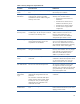
Table 1: Directory settings tests and possible results
Test name Successful result Failed result
Ping Directory
Server
The directory server responds to the ping
test.
The iLO processor could not verify a host at
the Directory Server Address.
Directory Server
DNS Name
The directory server address uses the DNS
naming format, and iLO successfully
searched for a network address using the
directory server name.
iLO could not get an IP address for the
directory server. Possible reasons:
• The Directory Server Name was
malformed.
• The DNS server did not have an
address for the directory server.
• The DNS server did not respond.
• iLO did not have a proper DNS
configuration.
Connect to
Directory Server
iLO accepted the directory server address
and LDAP port. This lets iLO open a network
connection to the directory server.
The host server at the Directory Server
Address refused a connection on the
Directory Server LDAP port or the
connection timed out. To troubleshoot,
verify that the port number is correct.
Connect using SSL iLO negotiated a secure communication
channel with the directory server and
completed an SSL handshake.
A failure may indicate that the directory
server is not accepting SSL connections.
This can occur when the AD server has no
SSL Certificate installed (see the “Checking
LDAP over SSL” section of this paper).
Certificate of
Directory Server
iLO received a directory server certificate
during the SSL handshake.
The certificate subject did not match the
Directory Server Address. This may happen
if the certificate was generated using a
DNS name and the Directory Server
Address is specified in IP notation.
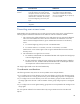
Bind to Directory
Server
The directory server accepted the
credentials.
A failure indicates that iLO rejected the
credentials or that the bind operation timed
out. Anonymous binds occur when iLO
makes a connection with no username.
User Authorization The user can access the iLO processor. The Test User credentials could not gain
any rights to iLO when accessing the
directory server. Check the user groups and
group membership in the Active Directory
Users and Computers Tool.
Directory
Administrator
Login
The directory server authenticated the
administrator distinguished name and
password.
This connection verifies the LOM object
settings and user search contexts. Other
tests may not run if you did not supply
administrator login credentials or the
credentials are invalid.
The directory server rejected the
credentials.
User
Authentication
The iLO processor granted access to the
user.
The directory server rejected the Test User
Name and Test User Password, even when
applying search contexts.