
Configuring HP Integrated Lights-Out 3 with Microsoft Active Directory HOWTO

13
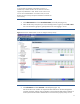
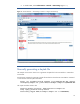
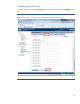
6. To enable SNTP, select Administration > Network > SNTP Settings (Figure 11).
Figure 11: Use the Network – SNTP Settings window to configure SNTP settings.
Manually generating a keytab file
The example in this section shows how to generate a keytab file for the iLO interface in a Windows
environment.
Use the ktpass command to generate a keytab file and set the shared secret. Note that the command
is case sensitive and has special characters:
ktpass -out iloexample.keytab +rndPass -ptype KRB5_NT_SRV_HST -mapuser
iloexample$@example.net -princ HTTP/iloexample.example.net@EXAMPLE.NET
The output should be similar to this:
Targeting domain controller: domaincontroller.example.net
Using legacy password setting method
Successfully mapped HTTP/iloexample.example.net to ILOEXAMPLE$.