
Configuring HP Integrated Lights-Out 3 with Microsoft Active Directory HOWTO

11
Note:
To get the ktpass and SetSPN commands for execution on
Windows XP, install the Windows Server 2003 Service Pack 2
support tools, KB926027 or later. Earlier versions will not work.
You can also install KB926027 on Windows Vista, but not all
features will work correctly. The ktpass and SetSPN commands will
work correctly.
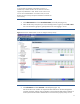
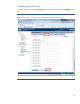
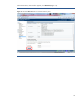
3. Click Administration and then User Administration in the left pane (Figure 9).
4. Select the Directory Group that you want to modify (user0 in Figure 9). Click Edit or New.
You can use Directory groups to grant permissions to users logging in to iLO.
Figure 9: Use the User Administration window to configure Directory Groups.
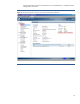
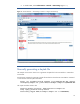
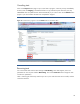
5. Click Information and then Overview in the left pane (Figure 10).
Use the iLO Overview window to compare the date and time on the iLO management
controller, the KDC, and the client workstation to ensure that the date and time settings on
all are synchronized. Kerberos authentication will not function properly if they are not