
Configuring HP Integrated Lights-Out 3 with Microsoft Active Directory HOWTO

10
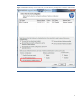
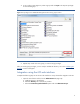
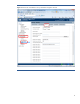
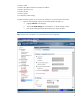
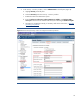
2. In the Security – Directory window, click on Administration in the left pane (Figure 8).
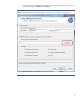
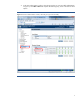
a. Highlight Security in the left pane.
b. Select the Directory tab in the Security – Directory window.
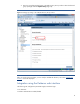
c. Enable the Kerberos Authentication option.
d. Enter the Kerberos realm name, Kerberos KDC server address, and Kerberos KDC
server port. Then browse to and select the binary file containing the Kerberos keytab.
e. Generate your keytab file manually, if necessary. Refer to the next section, “
Manually
generating a keytab file.”
Figure 8: Use the Security-Directory window to configure the Kerberos parameter.