
Integrated Lights-Out technology: enhancing the manageability of ProLiant servers technology brief
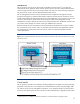
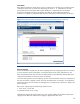
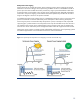
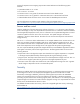
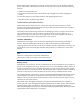
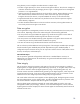
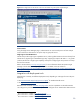

Figure 8. This diagram shows the HP iLO 2 device list accessible using HP Systems Insight Manager.
Power monitor
Using the Insight Power Manager plug-in, administrators can track overall power use from multiple
servers and use this information to set power caps on groups of servers.
Single sign-on from HP SIM to iLO
HP SIM can provide single sign-on capabilities to iLO, allowing administrators to browse directly from
HP SIM to iLO, bypassing an intermediate login step. Single-sign-on requires HP SIM v 5.1 or greater
(with the HP SIM iLO 2 Single Sign-on Update), and requires configuring the iLO processor to accept
the links from HP SIM.
Refer to the HP website,
www.hp.com/go/hpsim, for more information about HP Systems Insight
Manager. The HP SIM iLO 2 Single Sign-on update is available on the HP website at
http://h18013.www1.hp.com/products/servers/management/hpsim/dl_windows.html?jumpid=reg_
R1002_USEN#single.
Integration with deployment tools
Administrators commonly use different deployment tools, depending on what type of servers they are
deploying:
• HP
ProLiant Essentials Rapid Deployment Pack (RDP)
7
for Windows-based servers
• HP
Insight Control Linux Edition
8
for Linux-based servers
Both these tools use the HP
SmartStart Scripting Toolkit
9
and iLO capabilities so that administrators
can configure iLO processors or use iLO capabilities to configure servers. Details about these tools are
7
More information is available at www.hp.com/go/rdp.
8
More information is available at www.hp.com/go/controltower.
9
More information is available at www.hp.com/go/toolkit.
20