
iLO 2 Scripting and Command Line Guide
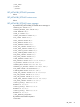
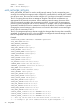
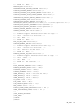
<REMOTE_CONSOLE_ENCRYPTION value="Yes"/>
<MIN_PASSWORD value="8"/>
<ILO_FUNCT_ENABLED value="Yes"/>
<VIRTUAL_MEDIA_PORT value="17988"/>
<F8_LOGIN_REQUIRED value="No"/>
<REMOTE_KEYBOARD_MODEL value="US"/>
<!-- Firmware support information for next 2 tags: -->
<!-- iLO 2 - All versions. -->
<!-- iLO - Version 1.50 and later. -->
<!-- RILOE II - Version 1.20 and later. -->
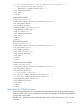
<PASSTHROUGH_CONFIG value="1"/>
<TERMINAL_SERVICES_PORT value="3389"/>
<!-- Firmware support information for next 5 tags: -->
<!-- iLO 2 - All versions. -->
<!-- iLO - Version 1.60 and later. -->
<!-- RILOE II - None. -->
<SSH_PORT value="22"/>
<SSH_STATUS value="Yes"/>
<SERIAL_CLI_STATUS value="3"/>
<SERIAL_CLI_SPEED value="1"/>
<RBSU_POST_IP value="Y"/>
<!-- Firmware support information for next tag: -->
<!-- iLO 2 - All versions. -->
<!-- iLO - None. -->
<!-- RILOE II - None. -->
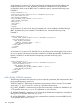
<TELNET_ENABLE value="yes"/>
<!-- Firmware support information for next tag: -->
<!-- iLO 2 - All versions. -->
<!-- iLO - Version 1.75 and later. -->
<!-- RILOE II - None. -->
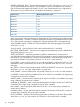
<!-- It can have the following three values -->
<!-- Disabled: Value = "No" -->
<!-- the mouse uses "relative" coordinates mode, -->
<!-- compatible with most host operating systems. -->
<!-- Enabled: Value = "Yes" -->
<!-- the mouse uses "absolute" coordinates mode, -->
<!-- eliminating synchronization issues -->
<!-- on supported operating systems -->
<!-- Automatic: Value = "Automatic" -->
<!-- iLO picks the appropriate mouse mode when -->
<!-- the iLO 2 driver is loaded on the host operating system.-->
<!-- The selected mode is persistent unless a different -->
<!-- mode is indicated when the OS driver is loaded or -->
<!-- if you choose another setting. -->
<HIGH_PERFORMANCE_MOUSE value="Automatic" />
<!-- Firmware support information for next 13 tags: -->
<!-- iLO 2 - Version 1.30 and later. -->
<!-- iLO - None. -->
98 Using RIBCL