
iLO 2 Scripting and Command Line Guide
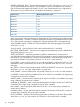

SHARED_NETWORK_PORT – Sets the Shared Network Port value. The values are Yes or No. For
iLO, the Shared Network Port feature is only available on servers with hardware, NIC firmware,
and iLO firmware that supports this feature. For iLO 2, the Shared Network Port is supported on
all firmware versions, and the feature is available if the hardware is supported.
Minimum iLO firmware versionProLiant server
1.64DL320G3
1.60DL360 G4
1.64DL360 G4
1.60DL380 G4
1.64DL385 G1
1.64DL580 G3
1.60ML370 G4
1.64ML570 G3
When using the iLO 2 Shared Network Port, flashing the iLO 2 firmware through the XML interface
takes approximately 7 minutes to complete. Flashing the firmware using Shared Network Port with
iLO 2 does not take any longer to complete than using the dedicated iLO 2 management port.
VLAN_ENABLED VALUE – Enables iLO 2 Shared Network Port VLAN ID tagging. The possible
values are yes or No.
VLAN_ID VALUE – Sets the VLAN ID value. Values must be between 1 and 4094.
REG_DDNS_SERVER VALUE – Instructs iLO 2 to register the management port with a DDNS server.
The possible values are Yes or No.
SPEED_AUTOSELECT – A Boolean parameter to enable or disable the iLO 2 transceiver to
auto-detect the speed and duplex of the network. This parameter is optional, and the Boolean string
must be set to Yes if this behavior is desired. If this parameter is used, the Boolean string value
must never be left blank. The possible values are Yes or No. It is case insensitive.
FULL_DUPLEX – Used to decide if the iLO 2 is to support full-duplex or half-duplex mode. It is only
applicable if SPEED_AUTOSELECT was set to No. The possible values are Yes or No. It is case
insensitive.
NIC_SPEED – Used to set the transceiver speed if SPEED_AUTOSELECT was set to No. The possible
values are 10 or 100. Any other values results in a syntax error.
DHCP_ENABLE – Used to enable DHCP. The possible values are Yes or No. It is case insensitive.
IP_ADDRESS – Used to select the IP address for the iLO 2 if DHCP is not enabled. If an empty string
is entered, the current value is deleted.
SUBNET_MASK – Used to select the subnet mask for the iLO 2 if DHCP is not enabled. If an empty
string is entered, the current value is deleted.
GATEWAY_IP_ADDRESS – Used to select the default gateway IP address for the iLO 2 if DHCP is
not enabled. If an empty string is entered, the current value is deleted.
DNS_NAME – Used to specify the DNS name for the iLO 2. If an empty string is entered, the
current value is deleted.
DOMAIN_NAME – Used to specify the domain name for the network where the iLO 2 resides. If
an empty string is entered, the current value is deleted.
DHCP_GATEWAY – Specifies if the DHCP-assigned gateway address is to be used. The possible
values are Yes or No. It is case sensitive. This selection is only valid if DHCP is enabled.
94 Using RIBCL