
iLO 2 Scripting and Command Line Guide
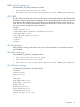
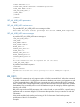

<RIB_INFO MODE="write">
……… RIB_INFO commands ……
</RIB_INFO>
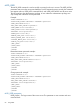
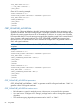
Clear iLO 2 event log example:
<RIBCL VERSION="2.0">
<LOGIN USER_LOGIN="adminname" PASSWORD="password">
<RIB_INFO MODE="write">
<CLEAR_EVENTLOG/>
</RIB_INFO>
</LOGIN>
</RIBCL>
CERT_SIGNATURE_ALGORITHM
Currently, iLO 2 firmware defaults to the MD5 message digest algorithm when generating a self
signed SSL certificate. The MD5 message digest is no longer considered a secure message digest
algorithm by security experts because of its vulnerability to collisions. As a result, some customers
have requested that iLO 2 use the stronger message digest algorithm named SHA1 instead of MD5
when it creates a self signed certificate. The CERT_SIGNATURE_ALGORITHM command was
introduced in iLO 2 2.00 firmware to allow customers to configure iLO 2 to generate a MD5 or
SHA1 self signed certificate.
NOTE: iLO 2 firmware will reset after the CERT_SIGNATURE_ALGORITHM command successfully
completes.
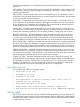
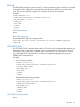
Examples:
<RIBCL VERSION="2.0">
<LOGIN USER_LOGIN="adminname" PASSWORD="password">
<RIB_INFO MODE = "write">
<CERT_SIGNATURE_ALGORITHM ="SHA1"/>
</RIB_INFO>
</LOGIN>
</RIBCL>
<RIBCL VERSION="2.0">
<LOGIN USER_LOGIN="adminname" PASSWORD="password">
<RIB_INFO MODE = "write">
<CERT_SIGNATURE_ALGORITHM ="MD5"/>
</RIB_INFO>
</LOGIN>
</RIBCL>
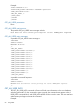
CERT_SIGNATURE_ALGORITHM parameters
CERT_SIGNATURE_ALGORITHM – “MD5” to generate an MD5 self signed certificate. “SHA1” to
generate a SHA1 self signed certificate.
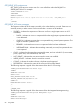
CERT_SIGNATURE_ALGORITHM runtime errors
• RIB information is open for read-only access. Write access is required for this operation.
• You must have a “Configure iLO 2 Settings” privilege level in order to change the signature
algorithm.
• The certificate signing algorithm parameter must be "MD5" or "SHA1".
86 Using RIBCL