
iLO 2 Scripting and Command Line Guide
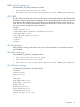
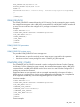
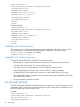
If the following parameters are not specified, then the parameter value for the specified user is
preserved.
USER_NAME – The actual name of the user to be added. This parameter is case sensitive, can be
any valid string, and has a maximum length of 39 characters. This string is used for display only
and must never be blank.
USER_LOGIN – The name used to gain access to the respective iLO 2. This parameter can be a
combination of any printable characters up to a maximum length of 39 characters. This parameter
is case sensitive and must never be blank.
PASSWORD – The password associated with the user. This parameter is case sensitive and can
be a combination of any printable characters. The length is user defined and can be a minimum
of zero characters and a maximum of 39 characters. The minimum length is defined in the iLO 2
Global Settings and has a default value of eight characters.
ADMIN_PRIV – A Boolean parameter that allows the user to administer user accounts. The user
can modify their account settings, modify other user account settings, add users, and delete users.
Omitting this parameter prevents the user from adding, deleting, or configuring user accounts.
REMOTE_CONS_PRIV – A Boolean parameter that gives permission for the user to access the
Remote Console functionality. This parameter is optional, and the Boolean string must be set to
Yes if the user must have this privilege. If this parameter is used, the Boolean string value must
never be left blank. Omitting this parameter denies the user access to Remote Console functionality.
RESET_SERVER_PRIV – A Boolean parameter that gives the user permission to remotely manipulate
the server power setting. This parameter is optional, and the Boolean string must be set to Yes if
the user must have this privilege. If this parameter is used, the Boolean string value must never be
left blank. Omitting this parameter prevents the user from manipulating the server power settings.
VIRTUAL_MEDIA_PRIV – A Boolean parameter that gives the user permission to access the virtual
media functionality. This parameter is optional, and the Boolean string must be set to Yes if the
user must have this privilege. If this parameter is used, the Boolean string value must never be left
blank. Omitting this parameter denies the user virtual media privileges.
CONFIG_ILO_PRIV – A Boolean parameter that allows the user to configure iLO settings. This
privilege includes network settings, global settings, Insight Manager settings, and SNMP settings.
This parameter is optional, and the Boolean string must be set to Yes if the user must have this
privilege. If this parameter is used, the Boolean string value must never be blank. Omitting this
parameter prevents the user from manipulating the current iLO 2 configuration.
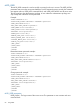
MOD_USER runtime errors
The possible MOD_USER error messages include:
• Login name is too long.
• Password is too short.
• Password is too long.
• User information is open for read-only access. Write access is
required for this operation.
• User login name must not be blank.
• Cannot modify user information for currently logged user.
• User does not have correct privilege for action. ADMIN_PRIV required.
GET_ALL_USERS
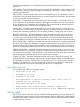
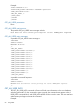
The GET_ALL_USERS command will return all USER_LOGIN parameters in the user database. For
this command to parse correctly, the command must appear within a USER_INFO command block,
and USER_INFO MODE can be in read or write. The user must have the administrative privilege
to retrieve all user accounts.
USER_INFO 83