
iLO 2 Scripting and Command Line Guide
DELETE_USER runtime errors
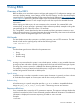
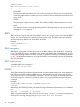
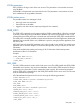
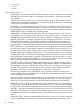
The possible DELETE_USER errors include:
• User information is open for read-only access. Write access is required for this operation.
• Cannot delete user information for currently logged in user.
• User login name was not found.
• User login name must not be blank.
• User does not have correct privilege for action. ADMIN_PRIV required.
DELETE_CURRENT_USER
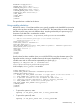
The DELETE_CURRENT_USER command is used to remove the user account defined by the
USER_LOGIN attribute. The USER_LOGIN parameter must exist in the current user database. For
this command to parse correctly, the command must appear within a USER_INFO command block,
and USER_INFO MODE must be set to write. The user must have the administrative privilege.
This command is intended for customers who desire to delete all user accounts on iLO 2.
Example:
<RIBCL VERSION="2.0">
<LOGIN USER_LOGIN="adminname"
PASSWORD="password">
<USER_INFO MODE="write">
<DELETE_CURRENT_USER/>
</USER_INFO>
</LOGIN>
</RIBCL>
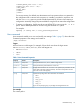
DELETE_CURRENT_USER parameters
None
DELETE_CURRENT_USER runtime errors
The possible DELETE_CURRENT_USER errors include:
User information is open for read-only access. Write access is required for this operation.
DELETE_SSH_KEY
The DELETE_SSH_KEY command deletes any SSH keys that are associated with the USER_LOGIN
from iLO 2. The DELETE_SSH_KEY command is implemented as a subcommand and must appear
within a MOD_USER command block.
This command requires CPQLOCFG.EXE version 2.27 or later.
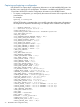
Example:
<RIBCL VERSION="2.0">
<LOGIN USER_LOGIN="admin" PASSWORD="admin123">
<USER_INFO MODE="write">
<MOD_USER USER_LOGIN="admin">
<DEL_USERS_SSH_KEY/>
</MOD_USER>
</USER_INFO>
</LOGIN>
</RIBCL>
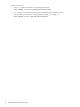
DELETE_SSH_KEY parameters
This command does not have parameters.
80 Using RIBCL