
iLO 2 Scripting and Command Line Guide
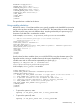
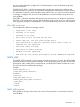
STATUS="0x0001"
MSG="There has been a severe error."
/>
• RESPONSE
This tag name indicates that the iLO 2 is sending a response to the previous commands back
to the client application to indicate the success or failure of the commands that have been sent
to the iLO 2.
• STATUS
This parameter contains an error number. The number 0x0000 indicates that there is no error.
• MSG
This element contains a message describing the error that happened. If no error occurred, the
message No error appears.
RIBCL
This command is used to start and end an RIBCL session. You can use it only once to start an RIBCL
session, and it must be the first command to display in the script. The RIBCL tags are required to
mark the beginning and the end of the RIBCL document.
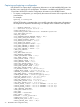
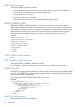
Example:
<RIBCL VERSION="2.0">
</RIBCL>
RIBCL parameters
VERSION is a string that indicates the version of the RIBCL that the client application is expecting
to use. The VERSION string is compared to the version of the RIBCL that is expected, and an error
is returned if the string and the version do not match. The preferred value for the VERSION parameter
is "2.0." The VERSION parameter is no longer checked for an exact match; however, this parameter
can never be blank.
RIBCL runtime errors
A possible RIBCL error message is:
Version must not be blank.
LOGIN
The LOGIN command provides the information that is used to authenticate the user whose permission
level will be used when performing RIBCL actions. The specified user must have a valid account
on the respective iLO 2 to execute RIBCL commands. The user's privileges are checked against the
required privilege for a particular command, and an error is returned if the privilege level does
not match.
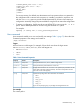
Example:
<LOGIN USER_LOGIN="username" PASSWORD="password">
</LOGIN>
Alternatively, the CPQLOCFG utility can specify the login information as parameters on its command
line:
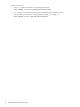
cpqlocfg -u <username> -p <password>
When using this format, the utility returns an Overriding credentials warning message but
still shows the error log message entry as Login name must not be blank.
76 Using RIBCL