
iLO 2 Scripting and Command Line Guide
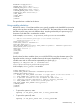
PASSWORD="floppyshoes">
<ADMIN_PRIV value ="No"/>
<REMOTE_CONS_PRIV value ="Yes"/>
<RESET_SERVER_PRIV value ="No"/>
<VIRTUAL_MEDIA_PRIV value ="No"/>
<CONFIG_ILO_PRIV value="Yes"/>
</ADD_USER>
</USER_INFO>
</LOGIN>
</RIBCL>
The specified user is added to the device.
Using variable substitution
HPONCFG version 1.2 and later enables you to specify variables in the XML RIBCL script and to
assign values to those variables when you run HPONCFG. This feature helps to avoid rewriting
the XML script file every time with different values. Anything enclosed by two percent sign (%)
characters in the XML file is considered a variable.
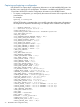
In this example, %username%, %loginname%, and %password% are variables:
<!-- Add user with minimal privileges to test default setting of
assigned privileges to 'N' -->
<RIBCL version="1.2">
<LOGIN USER_LOGIN="x" PASSWORD="x">
<USER_INFO MODE="write">
<ADD_USER USER_NAME="%username%" USER_LOGIN="%loginname%" PASSWORD="%password%">
<RESET_SERVER_PRIV value="Y" />
<ADMIN_PRIV value="Y" />
</ADD_USER>
</USER_INFO>
</LOGIN>
</RIBCL>
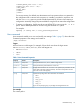
Specify values for these variables when you run HPONCFG by using the substitute option. The
argument must be a string or variable name and value pairs separated by a comma ( , ). The
variable name and its value must be separated by an equal sign (=):
hponcfg /f add_user.xml /s username=test
user,login=testlogin,password=testpasswd
In this example, %host_power% is a variable:
<RIBCL VERSION="2.0">
<LOGIN USER_LOGIN="adminname" PASSWORD="password">
<SERVER_INFO MODE="write">
<!-- Modify the HOST_POWER attribute to toggle power on the host server -->
<!-- HOST_POWER="No" (Turns host server power off) -->
<!-- A graceful shutdown will be attempted for ACPI-aware -->
<!-- operating systems configured to support graceful shutdown. -->
<!-- HOST_POWER="Yes" (Turns host server power on) -->
<SET_HOST_POWER HOST_POWER="%host_power%"/>
</SERVER_INFO>
</LOGIN>
</RIBCL>
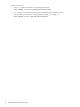
• To power the system on, enter:
hponcfg /f Set_Host_Power.xml /s host_power=YES
• To power the system off, enter:
hponcfg /f Set_Host_Power.xml /s host_power=NO
HPONCFG utility 71