
iLO 2 Scripting and Command Line Guide
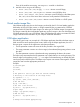
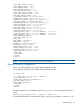
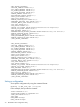
If any of the modules are missing, use modprobe <module> to load them.
2. Mount the drive using one of following:
• mount /dev/sda /mnt/floppy -t vfat – Mounts a virtual floppy.
• mount /dev/sda1 /mnt/keydrive – Mounts a virtual USB key drive.
• mount /dev/cdrom1 /mnt/cdrom – Mounts a virtual CD-ROM on a Red Hat system.
Use /dev/cdrom if the server does not have a locally attached CD-ROM drive.
• mount /dev/scd0 /mnt/cdrom – Mounts a virtual CD-ROM on a SUSE system.
Virtual media image files
Valid diskette images may be raw disk images, produced by the iLO 2 Virtual Media applet, the
UNIX utility dd, the DOS utility rawrite, or images created by the CPQIMAGE utility. CD-ROM
images must be ISO-9660 file system images. No other type of CD-ROM images are supported.
The images created by the Virtual Media applet are raw disk images in the case of diskettes and
ISO-9660 images in the case of CD-ROMs. Many CD-ROM burning utilities can create ISO-9660
images. Refer to the documentation of your utility for additional information.
CGI helper application
The following perl script is an example of a CGI helper application that allows diskette writes on
Web servers that cannot perform partial writes. When using the helper application, the iLO 2
firmware posts a request to this application with three parameters:
• The file parameter contains the name of the file provided in the original URL.
• The range parameter contains an inclusive range (in hexadecimal) designating where to write
the data.
• The data parameter contains a hexadecimal string representing the data to be written.
The helper script must transform the file parameter into a path relative to its working directory. This
function might involve prefixing it with "../," or it might involve transforming an aliased URL path
into the true path on the file system. The helper script requires write access to the target file. Diskette
image files must have the appropriate permissions.
Example:
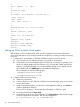
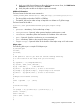
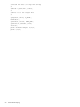
#!/usr/bin/perl
use CGI;
use Fcntl;
#
# The prefix is used to get from the current working
# directory to the location of the image file#
my ($prefix) = "..";
my ($start, $end, $len, $decode);
# Get CGI data
my $q = new CGI();
# Get file to be written
my $file = $q->param('file');
# Byte range
$range = $q->param('range');
# And the data
my $data = $q->param('data');
#
# Change the filename appropriately
Virtual media image files 61