
iLO 2 Scripting and Command Line Guide
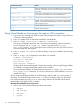

If the parameter contains multiple words, you must enclose the phrase within double quotes
(" "). Up to 25 variables are supported in an XML file. The maximum length of variable name
is 48 characters.
Web agent example:
<RIBCL VERSION="2.0">
<LOGIN USER_LOGIN="adminname" PASSWORD="password">
<RIB_INFO MODE="write">
<MOD_SNMP_IM_SETTINGS>
<WEB_AGENT_IP_ADDRESS value=%WebAgent%/>
</MOD_SNMP_IM_SETTINGS>
</RIB_INFO>
</LOGIN>
</RIBCL>
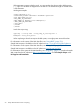
Invoke the script using:
cpqlocfg -s iLO-ip-name -f mod_snmp_im_settings.xml -t
WebAgent='"Your_Value_Here"'
When replacing a token that requires double quotes, use single quotes around the token.
For information on the syntax of the XML data files, see “Using RIBCL” (page 75)).
Sample XML scripts are available on the HP website at http://www.hp.com/servers/lights-out.
For information on the syntax of the XML data files, see “Using RIBCL” (page 75).
Sample XML scripts are available on the HP website at www.hp.com/go/iLO3.
For information on the syntax of the XML data files, see “Using RIBCL” (page 75). Download sample
XML scripts from the HP website at http://www.hp.com/go/ilo. Click iLO Sample Scripts under
iLO Support and Downloads.
54 Group administration and iLO 2 scripting