
iLO 2 Scripting and Command Line Guide
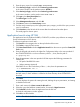


11. Click Finish to save the Application Launch task.
12. Click the Execute a Task icon (the green triangle) to execute the Group Administration.
Batch processing using CPQLOCFG
Group Administration is also delivered to iLO through batch processing. The components used by
batch processing are CPQLOCFG, an RIBCL file, and a batch file.
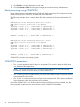
The following example shows a sample batch file used to perform the Group Administration for
iLO:
REM Updating the HP Integrated Lights-Out 2 board
REM Repeat line for each board to be updated
REM
CPQLOCFG -S RIB1 -F C:\...SCRIPT.XML -L RIB1LOG.TXT -V
CPQLOCFG -S RIB2 -F C:\...SCRIPT.XML -L RIB2LOG.TXT -V
CPQLOCFG -S RIB3 -F C:\...SCRIPT.XML -L RIB3LOG.TXT -V
.
.
.
RIBNLOG -S RIBN -F C:\...SCRIPT.XML -L LOGFILE.TXT -V
REM Updating the HP Integrated Lights-Out 3 board
REM Repeat line for each board to be updated
REM
CPQLOCFG -S RIB1 -F C:\...SCRIPT.XML -L RIB1LOG.TXT -V
CPQLOCFG -S RIB2 -F C:\...SCRIPT.XML -L RIB2LOG.TXT -V
CPQLOCFG -S RIB3 -F C:\...SCRIPT.XML -L RIB3LOG.TXT -V
.
.
.
RIBNLOG -S RIBN -F C:\...SCRIPT.XML -L LOGFILE.TXT -V
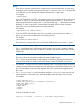
CPQLOCFG overwrites any existing log files.
CPQLOCFG parameters
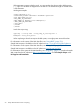
• The -S switch determines the iLO that is to be updated. This switch is either the DNS name
or IP address of the target server.
NOTE: Do not use this switch if you are launching from HP SIM. HP SIM automatically
provides the address of the iLO when you launch CPQLOCFG.
• The -F switch gives the full path location and name of the RIBCL file that contains the actions
to be performed on the board.
• The -U and -P switches specify the user login name and password. These options enable the
login information within the script file to be overridden.
Ensure that CPQLOCFG is in a directory referenced by the PATH environment variable. Any log
files generated are placed in the same directory as the CPQLOCFG executable.
52 Group administration and iLO 2 scripting