
iLO 2 Scripting and Command Line Guide


Mxagentconfig
Mxagentconfig is a utility used to export and install HP SIM public SSH keys into other systems.
This utility simplifies the process and can install the public key on many systems simultaneously.
Mxagentconfig will make an SSH connection to iLO 2, authenticate with a user name and password,
and transmit the necessary public key. iLO 2 stores this key as a trusted SSH client key.
Importing SSH keys from PuTTY
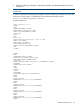
The public key file format generated by PuTTY is not compatible with iLO 2. The following example
illustrates, a PuTTY generated public key file:
---- BEGIN SSH2 PUBLIC KEY ----
Comment: "Administrator"
AAAAB3NzaC1yc2EAAAABJQAAAIB0x0wVO9itQB11o+tHnY3VvmsGgwghCyLOVzJl
3A9F5yzKj+RXJVPxOGusAhmJwF8PBQ9wV5E0Rumm6gNOaPyvAMJCG/l0PW7Fhac1
VLt8i5F3Lossw+/LWa+6H0da13TF2vq3ZoYFUT4esC6YbAACM7kLuGwxF5XMNR2E
Foup3w==
---- END SSH2 PUBLIC KEY ----
iLO 2 expects public key file information on a single line. You must use the PuTTY Key Generator
(puttygen.exe) utility to import a correctly formatted SSH key for use with iLO 2.
To import SSH keys to iLO 2 from PuTTY:
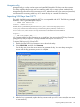
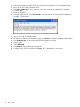
1. Double-click the PuTTY Key Generator icon to launch the utility.
2. Select SSH-2 RSA, and then click Generate.
On the key area, move the mouse around to generate the key. You must keep moving the
mouse until the key generation process is complete.
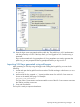
3. After the key is generated, replace the key comment with your iLO 2 user name (the user name
is case-sensitive).
Importing SSH keys from PuTTY 45