
iLO 2 Scripting and Command Line Guide


4 Secure Shell
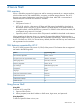
SSH overview
SSH is a Telnet-like program for logging into and for executing commands on a remote machine,
which includes security with authentication, encryption, and data integrity features. The iLO 2
firmware can support simultaneous access from two SSH clients. After SSH is connected and
authenticated, the command line interface is available.
iLO 2 supports:
• SSH protocol version 2
• PuTTY 0.58, which is a free version of Telnet and SSH protocol available for download on
the Internet. When using PuTTY, versions before 0.54 might display 2 line feeds instead on
a single line feed, when the ENTER key is pressed. To avoid this issue and for best results, HP
recommends using version 0.54 or later.
• OpenSSH, which is a free version of the SSH protocol available for download on the Internet.
When upgrading the firmware, there is a one-time 25-minute delay before SSH functionality is
available. During this time, iLO 2 generates the 1024-bit RSA and DSA keys. These keys are saved
by iLO 2 for future use. If iLO 2 is reset to factory defaults, the RSA and DSA keys are erased and
are regenerated on the next boot.
SSH features supported by iLO 2
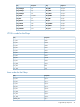
The iLO 2 library supports only version 2 (SSH-2) of the protocol. The features that are supported
are listed in the following table.
Supported algorithmFeature
ssh-dsa , ssh-rsaServer host key algorithms
3des-cbc, aes128-cbcEncryption (same set supported both ways)
hmac-sha1, hmac-md5Hashing algorithms
ssh-dss, ssh-rsaPublic key algorithms
Diffie-hellman-group1-sha1Key exchange
NoneCompression
EnglishLanguage
PasswordClient/User authentication method
2 minutesAuthentication timeout
3Authentication attempts
22Default SSH port
Using Secure Shell
Using SSH
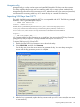
To access iLO 2 using SSH:
1. Open an SSH window.
2. When prompted, enter the IP address or DNS name, login name, and password.
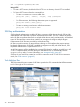
Using OpenSSH
To start an OpenSSH client in Linux, use:
SSH overview 43