
iLO 2 Scripting and Command Line Guide
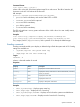
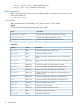
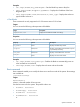
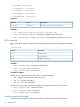
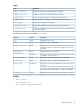

• BootFmCd : bootsource1
• BootFmFloppy : bootsource2
• BootFmDrive : bootsource3
• BootFmUSBKey : bootsource4
• BootFmNetwork : bootsource5
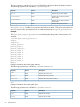
Properties
DescriptionAccessProperty
Sets the boot order for a given boot sourceRead/write
bootorder
Examples
• set /system1/bootconfig1/bootsource(n) bootorder=(num)
• show /system/bootconfig1 – Displays the complete boot configuration
• show /system1/bootconfig1/bootsource1 – Displays the boot order for bootsource1
LED commands
LED commands are used to change the state of the UID light on the server. LED settings are available
at:
/system1/led1
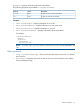
DescriptionProperty
Turns the LED on
start
Turns the LED off
stop
Displays the LED status
show
Examples
• show /system1/led1 – Displays current LED status
• start /system1/led1 – Turns LED on
• stop /system1/led1 – Turns LED off
iLO 2.00 CLI support
Simple UID CLI commands introduced in iLO 1.60 are still supported.
• uid – Displays the current UID state on the server
• uid on – Turns the UID light on
• uid off – Turns the UID light off
Instead of using the simple commands, the following examples show the new CLP format:
• show /system1/led1 – Verifies LED status
• start /system1/led1 – Turns LED on
• stop /system1/led1 – Turns LED off
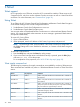
System properties and targets
The properties and targets, described in this section, provide information about the server.
34 Command line