
iLO 2 Scripting and Command Line Guide

Examples
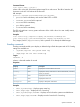
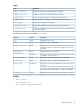
• set /map1/blade1/bay_name=BayOne – Sets the blade bay name to BayOne.
• show /map1/blade1/diagport1/ipaddress – Displays the IP address of the front
diagnostic port.
• show /map1/blade1/rack1/enclosure1(n)/encl_type – Displays the enclosure
type for blade enclosure n.
c-Class Blades
These commands are only supported in iLO 2 firmware version 2.09 or later.
Targets
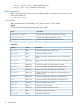
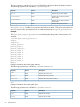
You can access the following subcomponents of the blade:
DescriptionTarget
Displays and modifies the blade rack settings.
/map1/blade1/rack
Properties
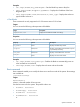
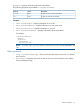
You can access the following subcomponents of the blade:
DescriptionAccessProperty
Displays the blade bay numberRead
bay_number
Displays and modifies if the blade 48 V power
is provided by the facility
Read/write
autopower
Displays and modifies thew rack nameRead/write
rack_name
Displays the rack serial numberRead
rack_sn
Examples
• set /map1/blade1/auto_power=yes – Enables the blade to automatically power on
when inserted into an enclosure
• show map1/blade1/rack – Displays the rack name and serial number
Boot commands
Boot commands enable you to modify the boot source and boot order of the system. Boot settings
are available at:
/system1/bootconfig1
Targets
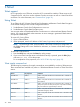
bootsource1..n,
where n is the total number of boot sources.
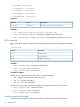
Sets the boot source for the system. The possible values are:
• BootFmCd : bootsource1
• BootFmFloppy : bootsource2
• BootFmDrive : bootsource3
• BootFmNetwork : bootsource4
or
Specific commands 33