
iLO 2 Scripting and Command Line Guide

• delete /system1/log1 – Deletes system event log.
• delete /map1/log1 – Deletes iLO 2 event log.
Blade commands
Blade commands enable you to view and modify the values on a p-Class or c-Class server. These
values are available at:
/system1/map1/blade1
p-Class Blades
These commands are only supported in iLO 2 firmware version 1.82 or earlier.
Targets
You can access the following subcomponents of the blade:
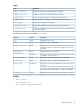
DescriptionTarget
Displays and modifies the front diagnostic port settings.
/map1/blade1/diagport
Displays and modifies the blade rack settings.
/map1/blade1/rack
Displays and modifies the blade enclosure settings.
/map1/blade1/rack1/enclosure1
Properties
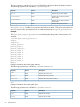
DescriptionAccessProperty
Displays and modifies the blade bay name.Read
bay_name
Displays the blade bay number.Read
bay_number
Displays and modifies if the blade 48 V power is provided by the
facility.
Read
facility_power
Displays and modifies if the blade is enabled to automatically power
up.
Read/write
auto_power
Displays and modifies if rack alert logging is enabled.Read/write
log_alerts
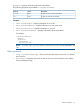
Displays and modifies the diagnostic port autoselect setting.Read/write
autoselect
Displays and modifies the diagnostic port speed setting.Read/write
speed
Displays and modifies if the diagnostic port supports full-duplex or
half-duplex mode.
Read/write
fullduplex
Displays and modifies the IP address for the diagnostic port.Read/write
ipaddress
Displays and modifies the subnet mask for the diagnostic port.Read/write
mask
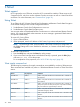
Displays and modifies the rack name.Read/write
rack_name
Displays the rack serial number.Read
rack_sn
Displays and modifies the enclosure name.Read/write
encl_name
Displays the enclosure serial number.Read
ser
Displays the enclosure type.Read
encl_type
32 Command line