
iLO 2 Scripting and Command Line Guide

Command format
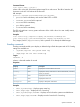
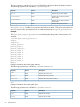
load -source <URL> [<target>]
where <URL> is the URL of firmware update image file on web server. The URL is limited to 80
characters in the iLO 2.00 release of the firmware.
URL example:
protocol://username:password@hostname:port/filename
• protocol field is mandatory and must be either HTTP or HTTPS.
• username:password field is optional.
• hostname field is mandatory.
• port field is optional
• filename field is mandatory.
The CLP only performs a cursory syntax verification of the <URL> value. You must visually ensure
the URL is valid.
Examples
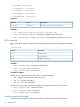
load -source http://imgserver.company.com/firmware/iloFWimage.bin
load -source http://john:abc123@imgserver.company.com/firmware/ilo.bin
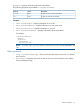
The [<target>] field is /map1/firmware, and is optional if it is already the default target.
Eventlog commands
Eventlog commands enable you to display or delete the logs of both the system and iLO 2. Eventlog
settings are available at:
• /system1/log1 for the system event log
• /map1/log1 for the iLO 2 event log
Targets
record:1..n
where n is the total number of records
Properties
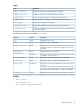
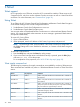
DescriptionAccessProperty
Displays the record number for the event.read
number
Displays the severity of the event. It can be informational, noncritical,
critical, or unknown.
read
severity
Displays the event date.read
date
Displays the event time.read
time
Displays a description of the event.read
description
Examples
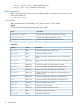
• show /system1/log1 – Displays system event log.
• show /map1/log1 – Displays the iLO 2 event log.
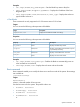
• show /system1/log1/recordn – Displays record n from the system event default text.
• show /map1/log1/recordn – Displays record n from the iLO 2 event log.
Specific commands 31