
iLO 2 Scripting and Command Line Guide
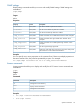
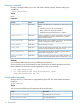

• vm device get – Gets the status of the virtual media
• vm device set boot access – Sets the status of the virtual media
Command options:
— Valid device names are floppy or cdrom
NOTE: USB key drives must be used with the floppy keyword syntax.
— The path is the URL to the media image
— Boot options are boot_once, boot_always, no_boot, connect, or disconnect
— Access options are write_protect or write_allow.
For more information about how to use these commands, see the commands
INSERT_VIRTUAL_MEDIA, EJECT_VIRTUAL_MEDIA, GET_VM_STATUS, and SET_VM_STATUS
in “Using RIBCL” (page 75).
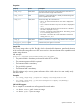
Tasks
• Insert a floppy USB key image into the Virtual Floppy/USBKey:
cd /map1/oemhp_vm1/floppydr1
show
set oemhp_image=http://my.imageserver.com/floppyimg.bin
set oemhp_boot=connect
show
This example executes the following commands:
— Changes the current context to the floppy or key drive.
— Shows the current status to verify that the media is not in use.
— Inserts the desired image into the drive.
— Connects the media. The boot setting always connects automatically.
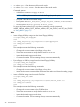
• Eject a floppy or USB key image from the Virtual Floppy/USBKey:
cd /map1/oemhp_vm1/floppydr1
set oemhp_boot=disconnect
This example executes the following commands:
— Changes the current context to the floppy or key drive.
— Issues the disconnect command that disconnects the media and clears the oemhp_image.
• Insert a CDROM image into the virtual CD-ROM:
cd /map1/oemhp_vm1/cddr1
show
set oemhp_image=http://my.imageserver.com/ISO/install_disk1.iso
set oemhp_boot=connect
show
This example executes the following commands:
— Changes the current context to the CD-ROM drive.
— Shows the current status to verify that the media is not in use.
— Inserts the desired image into the drive.
— Connects the media. The boot setting always connects automatically.
28 Command line