
iLO 2 Scripting and Command Line Guide

Directory commands
Directory commands enable you to view and modify directory settings. Directory settings are
available at:
/map1/oemhp_dircfg1
Targets
None
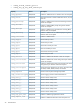
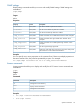
Properties
DescriptionAccessProperty
Enables or disables directory authentication. Valid settings are as
follows:
Read/Write
oemhp_dirauth
• extended_schemaUses HP extended schema
• default_schemaUses schema-free directories
• disabledDirectory-based authentication is disabled
Enables or disables local account authentication. This property
can be disabled only if directory authentication is enabled.
Boolean values accepted.
Read/Write
oemhp_localacct
Sets the directory server IP address or DNS name. The schema-free
directory configuration requires a DNS name.
Read/Write
oemhp_dirsrvaddr
Sets the directory server port.Read/Write
oemhp_ldapport
Displays the LOM object distinguished name. This field is ignored
when the schema-free directory configuration is used.
Read/Write
oemhp_dirdn
Sets the LOM object password. This field is ignored when the
default schema configuration is used.
Read/Write
oemhp_dirpassword
Displays the directory user login search context. This field is not
necessary when the schema-free directory configuration is used.
Read/Writeoemhp_usercntxt1, 2 ...
(up to 15)
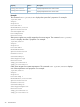
Examples
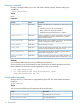
You can define additional groups using additional set commands.
You can specify one or more properties on the command line. If multiple properties are on the
same command line, then they must be separated by a space. For example:
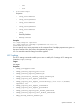
• set /map1/oemhp_dircfg1
• set /map1/oemhp_dircfg1 oemhp_dirauth=default_schema
oemhp_dirsrvaddr=adserv.demo.com
Virtual media commands
Access to the iLO 2 virtual media is supported through the CLP. The virtual media subsystem is
located at:
/map1/oemhp_vm1
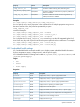
Targets
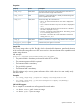
You can access the following sub-components of the virtual media.
DescriptionTarget
Virtual floppy or key drive device
/map1/oemhp_vm1/floppydr1
Virtual CD-ROM device
/map1/oemhp_vm1/cddr1
26 Command line