
iLO 2 Scripting and Command Line Guide

SNMP settings
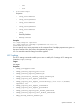
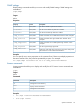
SNMP settings commands enable you to view and modify SNMP settings. SNMP settings are
available at
/map1/snmp1
.
Targets
None
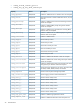
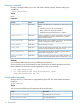
Properties
DescriptionAccessProperty
Sets the first SNMP trap destination address.Read/Write
accessinfo1
Sets the second SNMP trap destination address.Read/Write
accessinfo2
Sets the third SNMP trap destination address.Read/Write
accessinfo3
Enables or disables iLO 2 SNMP alerts. Boolean values accepted.Read/Write
oemhp_iloalert
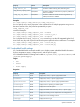
Enables or disables host agent SNMP alerts. Boolean values
accepted.
Read/Write
oemhp_agentalert
Enables or disables iLO 2 SNMP pass-through. Boolean values
accepted.
Read/Write
oemhp_snmppassthru
Sets the Insight Manager Agent URL.Read/Write
oemhp_imagenturl
Determines if the LOM device responds to anonymous XML queries.
Valid selections can be enabled and disabled.
Read/Write
oemhp_imdatalevel
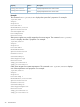
Examples
You can specify one or more properties on the command line. If there are multiple properties on
the same command line, they must be separated by a space. For example:
set /map1/snmp1 accessinfo1=192.168.0.50 oemhp_imdatalevel=Enabled
License commands
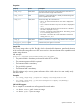
License commands enable you to display and modify the iLO 2 license. License commands are
available at:
/map1/
Targets
None
Commands
DescriptionCommand
Changes the current directory
cd
Displays license information
show
Changes the current license
set
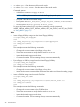
Examples
• set /map1 license=1234500000678910000000001
• show /map1 license
Specific commands 25