
iLO 2 Scripting and Command Line Guide
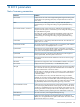
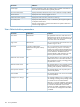
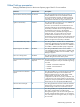
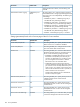
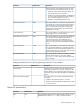
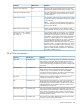

DefinitionDefault valueParameter
Toggles whether iLO 2 will use the DHCP server-supplied DNS server
list. If not, enter one in the Primary/Secondary/Tertiary DNS Server
boxes.
EnabledUse DHCP supplied
DNS servers
Toggles whether iLO 2 will use the DHCP server-supplied WINS server
list. If not, enter one in the Primary/Secondary WINS Server boxes.
EnabledUse DHCP supplied
WINS servers
Toggles whether iLO 2 will use the DHCP server-supplied static route.
If not, enter one in the Static Route #1, #2, #3 boxes.
EnabledUse DHCP supplied
static routes
Toggles whether iLO 2 will use the DHCP server-supplied domain
name. If not, enter one in the Domain Name box.
EnabledUse DHCP supplied
domain name
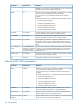
The iLO 2 automatically registers with a WINS server. By default,
WINS server addresses are assigned by DHCP.
EnabledWINS Server
Registration
The iLO 2 automatically registers with a DNS server. By default, DNS
server addresses are assigned by DHCP.
EnabledDDNS Server
Registration
This option causes iLO 2 to send four ICMP echo request packets to
the gateway when iLO 2 initializes. This option ensures that the ARP
DisabledPing gateway on
startup
cache entry for iLO 2 is current on the router responsible for routing
packets to and from iLO 2.
Enter the name of the domain in which iLO 2 participates. By default,
the domain name is assigned by DHCP.
N/A (DHCP)Domain name
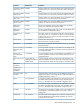
This setting is automatically detected if DHCP is set to yes. You cannot
change this setting.
N/A (DHCP)DHCP server
Use this parameter to assign a unique DNS server IP address on the
network. By default, the primary, secondary, and tertiary DNS servers
are assigned by DHCP.
N/A (DHCP)Primary, secondary,
and tertiary DNS
server
Use this parameter to assign a unique WINS server IP address on the
network. By default, the primary and secondary WINS servers are
assigned by DHCP.
N/A (DHCP)Primary and
secondary WINS
server
Use this parameter to assign a unique static route destination and
gateway IP address pair on the network. Up to three static route pairs
can be assigned. By default, the static routes are assigned by DHCP.
N/A for both the
destination and gateway
address (DHCP)
Static routes #1, #2,
#3
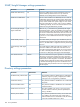
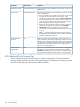
Blade server
parameters
Diagnostic port
configuration
parameters
Toggles the ability of the Transceiver to auto-detect the speed and
duplex of the network on the Diagnostic Port. Speed and Duplex are
disabled if Autoselect is set to yes.
YesTransceiver speed
autoselect
Configures the speed of the Diagnostic Port. This speed must match
the speed of the Diagnostic Port network. If the Autoselect option is
set to yes, the speed will be automatically configured by iLO 2.
N/A (autoselect)Speed
Configures the duplex of the Diagnostic Port. The duplex must match
the duplex of the Diagnostic Port network. If the Autoselect option is
set to yes, the duplex will be automatically configured by iLO 2.
N/A (autoselect)Duplex
The Diagnostic Port IP address. If DHCP is being used, the Diagnostic
Port IP address is automatically supplied. If not, enter a static IP
address here.
192.168.1.1IP address
The subnet mask for the Diagnostic Port IP network. If DHCP is being
used, the Subnet Mask is automatically supplied. If not, enter the
subnet mask for the network.
255.255.255.0Subnet mask
Network DHCP/DNS parameters 167