
iLO 2 Scripting and Command Line Guide

12 iLO 2 parameters
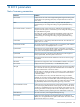
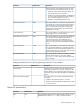
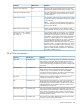
Status Summary parameters
DefinitionParameter
Displays the server name. If the Insight Management Agents are being used
with the host server operating system, they will provide the iLO 2 with the
server name.
Server name
Identifies the host. Although the UUID is assigned when the system is
manufactured, you can change this setting using the system RBSU during
POST.
UUID
Identifies the serial number of the server. Although the Serial Number is
assigned when the system is manufactured, you can change this setting using
the system RBSU during POST.
Server Serial Number / Product ID
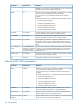
The Product ID is used to distinguish between different systems with similar
serial numbers. Although the Product ID is assigned when the system is
manufactured, you can change this setting using the system RBSU during
POST.
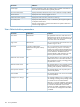
Appears when it is assigned by other software from HP. This value does not
appear when it is not set.
Virtual UUID
The Virtual Serial Number is displayed when it is assigned by other software
from HP. This value is not displayed when it is not set.
Virtual Serial Number
Represents the server internal health indicator, if supported. It summarizes
issues with fans, temperature sensors, VRMs, and other monitored subsystems
in the server. See the System Health page for details.
System Health
The family and version of the active system ROM. If the system supports a
backup system ROM, the backup date is also shown.
System ROM
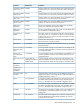
Represents the state of the Internal Health LED of the server when this page
was loaded.
Internal Health LED
Represents the configuration status of Trusted Platform Module in the system.TPM Status
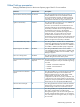
Displays if the host is powered ON, or in STANDBY (OFF) mode.Server Power
Represents the state of the Unit Identification light when this page was loaded.
You control the UID state using the button beside the UID icon in addition to
the physical UID buttons on the server chassis.
UID Light
The UID helps you identify and locate a system and is used to indicate that a
critical operation is in progress on the host, such as Remote console access
or firmware update.
The current state, ON or OFF, is the last state chosen using one of these
methods. If a new state is chosen while the UID is blinking, this new state
becomes the current state, and takes effect when the UID stops blinking. While
the UID is blinking, the "current state" of the UID will be shown along with the
tag (FLASHING). When the UID stops blinking, this tag is removed.
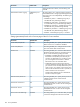
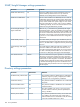
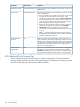
Displays the previously launched remote console and availability. This allows
you to launch your preferred remote console quickly. You can use the remote
Last Used Remote Console
console if it is available and you have user privileges. If the console is in use,
launching the remote console provides access to the acquire button. You can
choose a different console by following the Last Used Remote Console link.
The most recent entry in the Integrated Management Log.Latest IML Entry
Displays the name assigned to the Integrated Lights-Out 2 subsystem. By
default, this is iLO prepended to the system serial number. This value is used
for the network name, so it is unique.
iLO 2 Name
Status Summary parameters 161