
iLO 2 Scripting and Command Line Guide
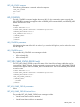
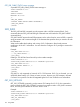
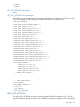
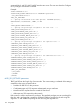
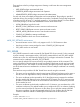
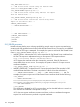

<SSO_INFO MODE="write">
<!-- Add an SSO server record using the network name
(works for TRUST_MODE NAME or ALL) -->
<SSO_SERVER NAME="hpsim1.hp.net" />
<!-- Add an SSO server record using indirect iLO import
from the network name -->
<SSO_SERVER IMPORT_FROM="hpsim2.hp.net" />
<!-- Add an SSO server certificate record using direct
import of certificate data -->
<IMPORT_CERTIFICATE>
-----BEGIN CERTIFICATE-----
.
.
.
-----END CERTIFICATE-----
</IMPORT_CERTIFICATE>
</SSO_INFO>
</LOGIN>
</RIBCL>
SSO_SERVER parameters
NAME indicates that the server is being specified by network name. It receives a quoted string
containing the fully qualified network name of the HP SIM Trusted Server. The name is not validated
by iLO 2 until an SSO login is attempted. For example, the syntax to add an HP SIM Trusted Server
name is <SSO_SERVER NAME="hpsim1.hp.net" />.
• IMPORT_FROM – Indicates that iLO 2 must request the HP SIM Trusted Server certificate from
HP SIM. This request is implemented using an anonymous HTTP request similar to:
http://<sim network address>:280/GetCertificate
iLO 2 requests the certificate when this command is processed. If the HP SIM server is
unreachable, then an error occurs. For example, the syntax to have iLO 2 import a server
certificate resembles:
<SSO_SERVER IMPORT_FROM="hpsim2.hp.net" />
• IMPORT_CERTIFICATE – Indicates that iLO 2 must import the literal .PEM encoded x.509
certificate data that follows. The data is encoded in a block of text that includes the
-----BEGIN CERTIFICATE----- and -----END CERTIFICATE----- text. For
example, the syntax to import an HP SIM Trusted Server certificate looks like the following:
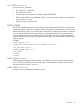
<SSO_SERVER>
-----BEGIN CERTIFICATE-----
MIIC3TCCAkYCBESzwFUwDQYJKoZIhvcNAQEFBQAwgbUxCzAJBgNVBAYTAlVTMRMwE................
kXzhuVzPfWzQ+a2E9tGAE/YgNGTfS9vKkVLUf6QoP/RQpYpkl5BxrsN3gM/PeT3zrxyTleE=
-----END CERTIFICATE-----
</SSO_SERVER>
The certificate is validated by iLO 2 to assure that it can be decoded before it is stored. An
error results if the certificate is a duplicate or corrupt.
iLO 2 does not support certificate revocation and does not honor certificates that appear
expired. You must remove any revoked or expired certificates.
156 Using RIBCL