
iLO 2 Scripting and Command Line Guide
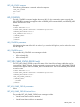
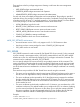

There are three roles for privilege assignment. Omitting a role leaves the current assignment
unaltered:
• USER_ROLEPrivileges associated with User
• OPERATOR_ROLEPrivileges associated with Operator
• ADMINISTRATOR_ROLEPrivileges associated with Administrator
For each role, there are multiple privileges that can be manipulated. The privilege is specified
within the role tag. If a privilege is omitted, the current value is unaltered. Each privilege assignment
is Boolean and can be set to "Y" (privilege granted) or "N" (privilege denied). For more details
on account privileges, see the User Administration section of the User Guide.
• LOGIN_PRIVAllows login for this role.
• REMOTE_CONS_PRIVGrants access to remote console resources.
• RESET_SERVER_PRIVGrants access to power and reset controls.
• VIRTUAL_MEDIA_PRIVGrants access to virtual media resources.
• CONFIG_ILO_PRIVAllows settings modification.
• ADMIN_PRIVAllows local user account modification.
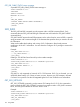
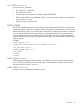
MOD_SSO_SETTINGS runtime errors
• Incorrect firmware version. SSO is only support on iLO 2 v1.30 firmware or later.
• User does not have correct privilege for action. CONFIG_ILO_PRIV required.
• SSO_INFO must be in write mode.
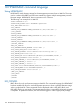
SSO_SERVER
SSO_SERVER command is used to create HP SIM Trusted SSO Server records. For this command
to parse correctly, it must appear within a SSO_INFO command block, and SSO_INFO MODE
must be set to write. You must have the Configure iLO 2 privilege to execute this command. This
command can be combined with MOD_SSO_SETTINGS.
You can specify multiple SSO server records by using multiple instances of this command. The
servers are added in the order that the records are specified. Duplicate records may be rejected
and generate an error. The number of records stored by the lights-out processor depends on the
size of the entries because certificates do not have a fixed size. Multiple certificates can normally
be stored.
There are three ways to add an HP SIM Trusted Server record using this command:
• The server can be specified by network name (requires SSO trust level set to trust by name or
trust all, but is not supported for trust by certificate). Use the fully qualified network name.
• The server certificate can be imported by iLO 2 (the LOM processor requests the certificate
from the specified HP SIM server using anonymous HTTP request). The iLO 2 processor must
be able to contact the HP SIM server on the network at the time this command is processed
for this method to work.
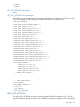
• The server certificate can be directly installed on iLO 2. However, you must obtain the x.509
certificate in advance. This method enables you to configure the iLO 2 in advance of placing
it on the network with the HP SIM server. It also allows you to verify the contents of the HP
SIM server certificate. See the HP Integrated Lights-Out 2 User Guide or the HP SIM User
Guide for additional methods of obtaining the certificate from the HP SIM server.
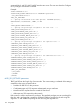
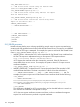
Example:
<RIBCL VERSION="2.0">
<LOGIN USER_LOGIN="Administrator" PASSWORD="password">
SSO_INFO 155