
iLO 2 Scripting and Command Line Guide
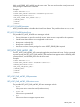
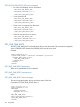
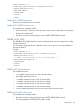
<RIBCL VERSION="2.0">
<LOGIN USER_LOGIN="adminname" PASSWORD="password">
<SERVER_INFO MODE="write">
<WARM_BOOT_SERVER/>
</SERVER_INFO>
</LOGIN>
</RIBCL>
WARM_BOOT_SERVER parameters
There are no parameters for this command.
WARM_BOOT_SERVER runtime errors
The possible error messages include:
• Server information is open for read-only access. Write access is required for this operation.
• Host power is already OFF.
• User does not have correct privilege for action. RESET_SERVER_PRIV required.
SERVER_AUTO_PWR
The SERVER_AUTO_PWR command is used to set the automatic power on and power on delay
settings of the server.
This command is supported by iLO 2 firmware version 1.20 or later. It is not supported by iLO
firmware or RILOE II.
Example:
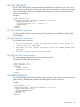
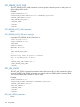
<RIBCL VERSION="2.0">
<LOGIN USER_LOGIN="Administrator" PASSWORD="password">
<SERVER_INFO MODE="write">
<!-- Enable automatic power on with 30 seconds delay -->
<SERVER_AUTO_PWR VALUE="30" />
</SERVER_INFO>
</LOGIN>
</RIBCL>
SERVER_AUTO_PWR parameters
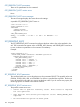
The possible values are:
• Yes enables automatic power on with a minimum delay.
• No disables automatic power on.
• 15 enables automatic power on with 15-second delay.
• 30 enables automatic power on with 30-second delay.
• 45 enables automatic power on with 45-second delay.
• 60 enables automatic power on with 60-second delay.
• Random enables automatic power on with random delay up to 60-second.
SERVER_AUTO_PWR runtime errors
The possible error messages include:
• User does not have correct privilege for action. RESET_SERVER_PRIV required.
• The value specified for SERVER_AUTO_PWR is invalid.
SERVER_INFO 149