
iLO 2 Scripting and Command Line Guide
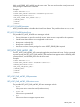
• Too many boot devices has been provided.
• Device has been repeated.
• Boot device not supported.
SET_PERSISTENT_BOOT return messages
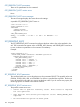
A possible SET_PERSISTENT_BOOT return is:
<?xml version="1.0"?>
<RIBCL VERSION="2.22">
<RESPONSE
STATUS="0x0000"
MESSAGE='No error'
/>
</RIBCL>
GET_PWREG_CAPABILITIES
The GET_PWREG_CAPABILITIES command requests iLO 2 power regulator information related to
system power minimum and maximum values, power supply type and capacity, and power
microprocessor firmware version. For this command to parse correctly, the
GET_PWREG_CAPABILITIES command must appear within a SERVER_INFO command block, and
SERVER_INFO MODE must be set to read.
Example:
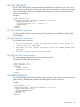
<RIBCL VERSION="2.0">
<LOGIN USER_LOGIN="adminname" PASSWORD="password">
<SERVER_INFO MODE="read">
<GET_PWREG_CAPABILITIES/>
</SERVER_INFO>
</LOGIN>
</RIBCL>
GET_PWREG_CAPABILITIES parameters
None
GET_PWREG_CAPABILITIES runtime errors
The possible GET_PWREG_CAPABILITIES error messages include:
• Error if the power micro cannot be read (hardware issue).
• Power Off if the server is powered off.
• N/A if the server does not support a power micro.
GET_PWREG_CAPABILITIES return messages
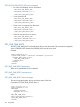
<GET_PWREG_CAPABILITIES>
<FWVERSION>"1.77"</FWVERSION>
<THRD ID="0" SOCKET="1" CORE="0" THREAD="0"/>
<QS Q="0" P="0" L="100"/>
<QS Q="1" P="1" L="75"/>
<QS Q="2" P="1" L="75"/>
<QS Q="3" P="1" L="75"/>
<QS Q="4" P="1" L="75"/>
<QS Q="5" P="1" L="75"/>
SERVER_INFO 145