
iLO 2 Scripting and Command Line Guide
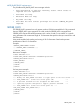
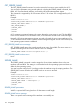
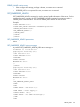
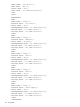
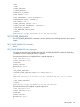
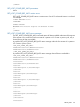
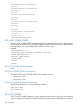
<CurrentPstate>2</CurrentPstate>
<Pstate0>
<TotalAverage>34.3</TotalAverage>
</Pstate0>
<Pstate1>
<TotalAverage>0</TotalAverage>
</Pstate1>
<Pstate2>
<TotalAverage>65.7</TotalAverage>
</Pstate2>
<Pstate3>
.....
<Pstate7>
<TotalAverage>0</TotalAverage>
</Pstate7>
</Processor1>
</GET_HOST_POWER_REG_INFO>
GET_HOST_POWER_STATUS
The GET_HOST_POWER_STATUS command requests the power state of the server. For this command
to parse correctly, the GET_HOST_POWER_STATUS command must appear within a SERVER_INFO
command block. You can set SERVER_INFO MODE to read or write.
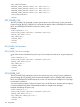
Example:
<RIBCL VERSION="2.0">
<LOGIN USER_LOGIN="adminname" PASSWORD="password">
<SERVER_INFO MODE="write">
<GET_HOST_POWER_STATUS/>
</SERVER_INFO>
</LOGIN>
</RIBCL>
GET_HOST_POWER_STATUS Parameters
None
GET_HOST_POWER_STATUS Runtime Errors
The possible GET_HOST_POWER_STATUS error messages include:
• Host power is OFF.
• Host power is ON.
GET_HOST_POWER_STATUS Return Messages
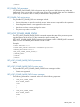
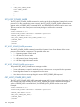
The following information is returned within the response:
<GET_HOST_POWER
HOST POWER="OFF"
/>
SET_HOST_POWER
The SET_HOST_POWER command is used to toggle the power button of server. For this command
to parse correctly, the SET_HOST_POWER command must appear within a SERVER_INFO command
140 Using RIBCL