
iLO 2 Scripting and Command Line Guide
GET_SERVER_NAME
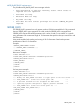
The GET_SERVER_NAME command is used to retrieve the host server name used by the iLO 2.
You can set this parameter using several methods, including the SERVER_NAME command, host
RBSU, iLO 2 browser-based interface, and loading HP ProLiant Management Agents.
This command is supported by iLO 2 firmware version 1.30 or later. It is not supported by iLO or
RILOE II.
Example:
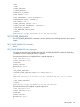
<RIBCL version="2.21">
<LOGIN USER_LOGIN="Administrator" PASSWORD="password">
<SERVER_INFO MODE="READ" >
<GET_SERVER_NAME />
</SERVER_INFO>
</LOGIN>
</RIBCL>
iLO 2 maintains consistency between the various places the server name is used. The host RBSU
has a two-line limitation of 14 characters each, or 28 characters of total server name text length.
Normally, HP ProLiant Management Agents are used to forward the server name attribute to iLO
2. This command can be used in instances where management agents are not used. However, the
host operating system remains unaffected.
GET_SERVER_NAME return message
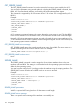
GET_SERVER_NAME returns the currently stored server name, if available. The server name is a
quoted ASCII string and cannot be a network name. For example:
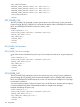
<SERVER_NAME VALUE="Linux Development Host" />
GET_SERVER_NAME runtime errors
None
SERVER_NAME
The SERVER_NAME command is used to assign the Server Name attribute shown in the user
interface and host RBSU. This setting is not forwarded to the host operating system and does not
affect the host operating system.
You must have the configure iLO 2 privilege to alter this attribute using the scripting interface. The
SERVER_INFO section must be set to WRITE mode or an error is returned.
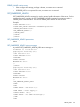
Example:
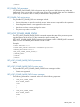
<RIBCL version="2.21">
<LOGIN USER_LOGIN="Administrator" PASSWORD="password">
<SERVER_INFO MODE="write" >
<SERVER_NAME VALUE = "Exchange05" />
</SERVER_INFO>
</LOGIN
SERVER_NAME parameters
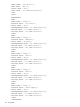
VALUE is a quoted ASCII string less than 50 characters in total length.
SERVER_NAME return message
There is no specific return message if this attribute is successfully set.
132 Using RIBCL