
iLO 2 Scripting and Command Line Guide
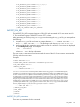
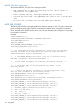
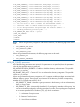
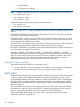
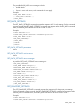
<RACK_INFO MODE="read">
<GET_DIAGPORT_SETTINGS/>
</RACK_INFO>
</LOGIN>
</RIBCL>
GET_DIAGPORT_SETTINGS parameters
None
GET_DIAGPORT_SETTINGS runtime errors
None
GET_DIAGPORT_SETTINGS return messages
A possible GET_DIAGPORT_SETTINGS return message is:
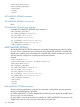
<GET_DIAGPORT_SETTINGS>
<DP_SPEED_AUTOSELECT value="No"/>
<DP_NIC_SPEED value="100"/>
<DP_FULL_DUPLEX value="Yes"/>
<DP_IP_ADDRESS value="192.168.142.56"/>
<DP_SUBNET_MASK value="255.255.0.0"/>
</GET_DIAGPORT_SETTINGS >
MOD_DIAGPORT_SETTINGS
The MOD_DIAGPORT_SETTINGS command is used modify the diagnostic port network settings
on iLO 2. For this command to parse correctly, the MOD_DIAGPORT_SETTINGS command must
appear within a RACK_INFO command block, and RACK_INFO MODE must be set to write. The
user must have the configure iLO 2 privilege to execute this command.
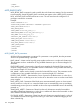
Example:
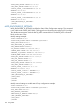
<RIBCL VERSION="2.0">
<LOGIN USER_LOGIN="username" PASSWORD="password">
<RACK_INFO MODE="write">
<MOD_DIAGPORT_SETTINGS>
<DP_SPEED_AUTOSELECT value="No"/>
<DP_NIC_SPEED value="100"/>
<DP_FULL_DUPLEX value="Yes"/>
<DP_IP_ADDRESS value="192.168.142.56"/>
<DP_SUBNET_MASK value="255.255.0.0"/>
</MOD_DIAGPORT_SETTINGS>
</RACK_INFO>
</LOGIN>
</RIBCL>
MOD_DIAGPORT_SETTINGS parameters
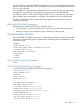
All of the following parameters are optional. If a parameter is not specified, then the parameter
value for the specified setting is preserved.
DP_SPEED_AUTOSELECT is used to automatically select the transceiver speed. The possible values
are Yes or No. It is case insensitive.
DP_NIC_SPEED is used to set the transceiver speed if DP_SPEED_AUTOSELECT was set to No. The
possible values are 10 or 100. Any other value results in a syntax error.
126 Using RIBCL