
iLO 2 Scripting and Command Line Guide
</RIBCL>
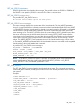
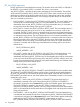
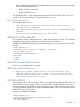
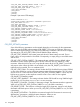
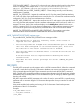
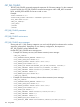
• Importing a CA and a user certificate example:
<RIBCL VERSION="2.0">
<LOGIN USER_LOGIN="test" PASSWORD="password">
<RIB_INFO MODE="write">
<MOD_TWOFACTOR_SETTINGS>
<CERT_OWNER_SAN/>
<IMPORT_CA_CERTIFICATE>
-----BEGIN CERTIFICATE-----
MIIEtzCCA5+gAwIBAgIQBGg9C0d7B5pF/l4bVA44hjANBgkqhkiG9w0BAQUFADBM
MRMwEQYKCZImiZPyLGQBGRYDTEFCMRUwEwYKCZImiZPyLGQBGRYFSkpSSUIxHjAc
...
9gVCPSOQUGMMZUeNYOBkTE0e+MrPGL+TqQEyIakF3rjA2PbL1uSY6d4dlCx7izkO
buEpHTPDqs9gZ3U5ht9bjES93UHnDENLopkZ2JgGwH8Y50eBnjq4xml9psbYZn5Y
yWpONE/IjIjJyww=
-----END CERTIFICATE-----
</IMPORT_CA_CERTIFICATE>
<IMPORT_USER_CERTIFICATE USER_LOGIN="apollo">
-----BEGIN CERTIFICATE-----
CZImiZPyLGQBGRYDTEFCMRUwEwYKCZImiZPyLGQBGRYFSkpSSUIxHjAcBgNVBAMT
ODU5NDRaMFYxEzARBgoJkiaJk
...
sjbbpNGpxGsK9GZi5j6UeOYklePyau0TJ3KIm2RPlR2C6XAGz2PTWgsxGlUP9lNH
bfz0+TD0JsschjqK23/vr2GxQ9C/835zRxdu5Dn8JGm3/dFHR2VxgCetIxyR9TQC
ZKTfvIa8N9KvMLZdclSj94jUyMZjYYmCWULW8WySMV70nclvrsI2hi3nwMtt2Zvj
WnbeZujBX9LGz3HdmghgUw4GTwYl3ZG88snuTyXliLPFXVYXvNAhGeWqXtrh7A90
3NprjG7DM1uw
-----END CERTIFICATE-----
</IMPORT_USER_CERTIFICATE>
</MOD_TWOFACTOR_SETTINGS>
</RIB_INFO>
</LOGIN>
</RIBCL>
MOD_TWOFACTOR_SETTINGS parameters
All of the following parameters are optional. If a parameter is not specified, then the parameter
value for the specified setting is preserved.
AUTH_TWOFACTOR_ENABLE – Enables or disables Two-Factor authentication. The possible values
are Yes and No.
CERT_REVOCATION_CHECK – Causes iLO 2 to use the CRL distribution point attribute of the client
certificate to download the CRL and check against revocation. The possible values are Yes and
No. If this setting is set to Yes, and the CRL cannot be downloaded for any reason, authentication
will be denied.
CERT_OWNER_SAN – Causes iLO 2 to extract the User Principle Name from the Subject Alternative
Name, and use that for authentication with the directory, for example:
username@domain.extension.
118 Using RIBCL