
iLO 2 Scripting and Command Line Guide

<CERT_OWNER_SUBJECT/>
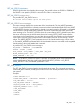
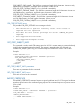
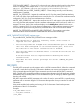
</GET_TWOFACTOR_SETTINGS>
Example of a Two-Factor Authentication settings return message when SAN field in the certificate
for directory authentication is enabled:
<GET_TWOFACTOR_SETTINGS>
<AUTH_TWOFACTOR_ENABLE VALUE="Y"/>
<CERT_REVOCATION_CHECK VALUE="N"/>
<CERT_OWNER_SAN/>
</GET_TWOFACTOR_SETTINGS>
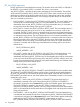
MOD_TWOFACTOR_SETTINGS
The MOD_TWOFACTOR_SETTINGS command is used to modify the Two-Factor Authentication
settings on the iLO 2. For this command to parse correctly, the MOD_TWOFACTOR_SETTINGs
command must appear within a RIB_INFO command block, and RIB_INFO MODE must be set to
write. You must have the configure RILOE II privilege to execute this command. Changing the value
of AUTH_TWOFACTOR_ENABLE causes the iLO 2 to reset for the new setting to take effect.
NOTE: The GET_TWOFACTOR_SETTINGS and MOD_TWOFACTOR_SETTINGS commands
are supported with iLO firmware version 1.80 and above and with iLO 2 firmware version 1.10
and above. iLO 1.80 requires CPQLOCFG version 2.24, and iLO 1.10 requires CPQLOCFG version
2.25.
A Trusted CA Certificate is required for Two-Factor Authentication to function. The iLO 2 will not
allow the AUTH_TWOFACTOR_ENABLE setting to be set to yes if a Trusted CA certificate has
not been configured. Also, a client certificate must be mapped to a local user account if local user
accounts are being used. If the iLO 2 is using directory authentication, client certificate mapping
to local user accounts is optional.
To provide the necessary security, the following configuration changes are made when Two-Factor
Authentication is enabled:
• Remote Console Data Encryption: Yes (this disables Telnet access)
• Enable Secure Shell (SSH) Access: No
• Serial Command Line Interface Status: Disabled
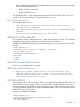
If Telnet, SSH or Serial CLI access is required, re-enable these settings after Two-Factor Authentication
is enabled. However, because these access methods do not provide a means of Two-Factor
Authentication, only a single factor is required to access the iLO 2 with Telnet, SSH, or serial CLI.
When Two-Factor Authentication is enabled, access with the CPQLOCFG utility is disabled because
CPQLOCFG does not supply all authentication requirements. However, the HPONCFG utility is
functional, since administrator privileges on the host system are required to execute this utility.
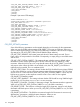
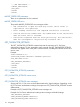
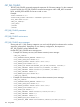
• Example of enabling Two-Factor Authentication:
<RIBCL VERSION="2.0">
<LOGIN USER_LOGIN="adminname" PASSWORD="password">
<RIB_INFO MODE="write">
<MOD_TWOFACTOR_SETTINGS>
<AUTH_TWOFACTOR_ENABLE value="Yes"/>
<CERT_REVOCATION_CHECK value="No"/>
<CERT_OWNER_SAN/>
</MOD_TWOFACTOR_SETTINGS>
</RIB_INFO>
</LOGIN>
RIB_INFO 117