
iLO 2 Scripting and Command Line Guide
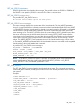
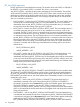
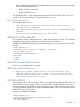
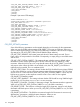
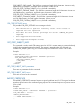
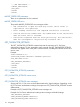
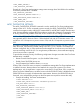
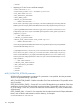
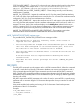
<CSR_USE_CERT_CUSTOM_SUBJECT VALUE = "No"/>
<CSR_USE_CERT_2048PKEY VALUE = "Yes" />
<CSR_USE_CERT_FQDN VALUE = "Yes" />
</CSR_CERT_SETTINGS>
</RIB_INFO>
</LOGIN>
</RIBCL>
Example 2 (set custom CSR settings):
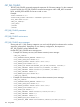
<RIBCL VERSION="2.0">
<LOGIN USER_LOGIN="adminname" PASSWORD="password">
<RIB_INFO MODE="write">
<CSR_CERT_SETTINGS>
<CSR_USE_CERT_CUSTOM_SUBJECT VALUE = "Yes"/>
<CSR_USE_CERT_2048PKEY VALUE = "Yes" />
<CSR_SUBJECT_COUNTRY VALUE ="US"/>
<CSR_SUBJECT_STATE VALUE ="California"/>
<CSR_SUBJECT_LOCATION VALUE ="San Diego"/>
<CSR_SUBJECT_ORG_NAME VALUE ="Hewlett-Packard LLC"/>
<CSR_SUBJECT_ORGUNIT_NAME VALUE ="Server Group"/>
<CSR_SUBJECT_COMMON_NAME VALUE ="hp.ilo.com"/>
</CSR_CERT_SETTINGS>
</RIB_INFO>
</LOGIN>
</RIBCL>
CSR_CERT_SETTINGS parameters
Some of the following parameters can be omitted depending on the setting of other parameters.
When user opts for default subject settings, CSR_SUBJECT_xxxx tags are irrelevant. When user
opts for custom subject settings, CSR_USE_CERT_FQDN tag is irrelevant. If the user does not apply
any settings for CSR_USE_CERT_FQDN (with the Default subject selection),
CSR_USE_CERT_2048PKEY, then system preserved values for these settings are used. Zero or
Empty values are not permitted in some fields. Consequently, an empty string in some fields return
with an error.
CSR_USE_CERT_CUSTOM_SUBJECT – This setting indicates whether custom or default subject
information is to be used for generating the CSR. The values are Yes, No/ Default. It is case
insensitive. When this field is set to Yes, script should contain all the 6 CSR_SUBJECT_xxxx fields
with proper values. When this field is set to Default or No, the CSR_SUBJECT_xxxx fields are
irrelevant and not needed. This is a mandatory field.
CSR_USE_CERT_FQDN – This setting indicates whether the Fully Qualified Domain Name (FQDN)
or short name should be used as certificate common name when generating the CSR. The values
are Yes or No. It is case insensitive. When CSR_USE_CERT_CUSTOM_SUBJECT is set to Yes, this
field serves no purpose, as the certificate common name is set to value of user supplied
CSR_SUBJECT_COMMON_NAME.
CSR_USE_CERT_2048PKEY – This setting indicates whether CSR should be using 2048-bit length
private key or not. The values are Yes or No. It is case insensitive.
CSR_SUBJECT_COUNTRY – This field is 2 characters in length. The characters must be in uppercase.
When you set CSR_USE_CERT_CUSTOM_SUBJECT to Yes, this field is mandatory.
CSR_SUBJECT_STATE – This field has a maximum length of 30 characters. It must use only alpha
characters and blank spaces. When you set CSR_USE_CERT_CUSTOM_SUBJECT to Yes, this field
is mandatory.
CSR_SUBJECT_LOCATION – This field has a maximum length of 60 characters. It must use only
alphanumeric, punctuation, and blank space characters. When you set
CSR_USE_CERT_CUSTOM_SUBJECT to Yes, this field is mandatory.
114 Using RIBCL