
iLO 2 Scripting and Command Line Guide
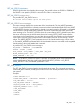
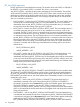
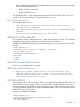
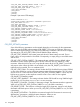
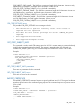
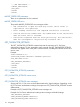
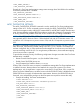
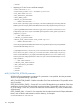
SET_VM_STATUS parameters
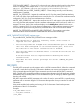
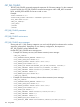
DEVICE specifies the Virtual Media device target. The possible values are FLOPPY or CDROM. If
the DEVICE is not specified, FLOPPY is assumed. This value is case-sensitive.
VM_BOOT_OPTION – Specifies the boot option parameter for the Virtual Media. The possible
values are BOOT_ALWAYS, BOOT_ONCE, or NO_BOOT. These values control how the Virtual
Media device behaves during the boot phase of the server. Setting these values does not affect
the current state of the Virtual Media device. These settings only take affect if the Virtual Media
device is connected at server boot.
• BOOT_ALWAYS – Sets the VM_BOOT_OPTION to BOOT_ALWAYS. The Virtual Media device
will always be connected during server boot. The Virtual Media device is not connected
immediately when the VM_BOOT_OPTION is set. The Virtual Media device is connected on
the next server boot after setting of the VM_BOOT_OPTION.
• BOOT_ONCE – Sets the VM_BOOT_OPTION to BOOT_ONCE. The Virtual Media device is
connected during the next server boot, but on any subsequent server boots, it will not be
connected. The BOOT_ONCE option is intended to boot one time to the Virtual Media device,
use that device while the server is running, and then not have the Virtual Media device available
on subsequent server reboots. The Virtual Media device is not connected immediately when
the VM_BOOT_OPTION is set. The Virtual Media device is connected on the next server boot
following the setting of the VM_BOOT_OPTION. After the server has booted once with the
Virtual Media device connected, on the subsequent server reboot, the Virtual Media device
will not be connected and the following Virtual Media device settings will be reset to their
default values:
◦ BOOT_OPTION=NO_BOOT
◦ IMAGE_INSERTED = NO
• NO_BOOT – Sets the VM_BOOT_OPTION to NO_BOOT. The Virtual Media device is not
connected during the next server boot. The Virtual Media device is not disconnected
immediately when the VM_BOOT_OPTION is set. The Virtual Media device will be disconnected
on the next server boot following the setting of the VM_BOOT_OPTION. After the server has
booted, the Virtual Media device will not be connected and the following Virtual Media device
settings will be reset to their default values:
◦ BOOT_OPTION = NO_BOOT
◦ IMAGE_INSERTED = NO
In addition to the VM_BOOT_OPTIONS, CONNECT and DISCONNECT are also possible values.
The CONNECT and DISCONNECT settings can be used to control the Virtual Media devices in
the same way that they are controlled in the Virtual Media applet. Whenever the CONNECT or
DISCONNECT parameters are set, the Virtual Media device immediately connects or disconnects,
respectively, to the server.
• CONNECT – Sets the VM_BOOT_OPTION to CONNECT. The Virtual Media device is
immediately connected to the server. Setting the VM_BOOT_OPTION to CONNECT is
equivalent to clicking the device Connect button on the Virtual Media Applet. After setting the
VM_BOOT_OPTION to CONNECT, the VM_GET_STATUS command will show the
VM_BOOT_OPTION as BOOT_ALWAYS. This is by design and shows that the Virtual Media
device is connected like the Virtual Media device in the applet which with always be connected
during all server boots.
• DISCONNECT – Sets the VM_BOOT_OPTION to DISCONNECT. The Virtual Media device
is immediately disconnected from the server. Setting the VM_BOOT_OPTION to DISCONNECT
is equivalent to clicking the device Disconnect button on the Virtual Media Applet. Additionally,
setting the VM_BOOT_OPTION to DISCONNECT is equivalent to issuing the
EJECT_VIRTUAL_MEDIA command. When the VM_BOOT_OPTION is set to DISCONNECT,
112 Using RIBCL