
iLO 2 Scripting and Command Line Guide
LICENSE runtime errors
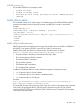
The possible LICENSE error messages include:
• License key error.
• License is already active.
• User does not have correct privilege for action. CONFIG_ILO_PRIV
required.
INSERT_VIRTUAL_MEDIA
This command notifies iLO 2 of the location of a diskette image. The INSERT_VIRTUAL_MEDIA
command must display within a RIB_INFO element, and RIB_INFO must be in write mode.
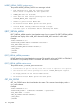
Example:
<RIBCL VERSION="2.0">
<LOGIN USER_LOGIN = "adminname" PASSWORD = "password">
<RIB_INFO MODE = "write">
<INSERT_VIRTUAL_MEDIA DEVICE="FLOPPY" IMAGE_URL= "http://servername/path/to/file"/>
</RIB_INFO>
</LOGIN>
</RIBCL>
INSERT_VIRTUAL_MEDIA parameters
DEVICE specifies the Virtual Media device target. The possible values are FLOPPY or CDROM. If
the DEVICE is not specified, FLOPPY is assumed. This value is case-sensitive.
IMAGE_URL specifies the URL for the diskette image. The URL format is as follows:
protocol://username:password@hostname:port/filename,cgi-helper
• The protocol field is mandatory and must be either http or https.
• The username:password field is optional.
• The hostname field is mandatory.
• The port field is optional.
• The filename field is mandatory.
• The cgi-helper field is optional.
In addition, the filename field can contain tokens that expand to host-specific strings:
• %m – Expands to the iLO 2 MAC address.
• %i – Expands to the iLO 2 IP address in dotted-quad form.
• %h – Expands to the iLO 2 hostname.
Examples:
http://john:abc123@imgserver.company.com/disk/win98dos.bin,/cgi-bin/hpvfhelp.pl
http://imgserver.company.com/disk/boot%m.bin
This command specifies only the location of the image to be used. For the image to be connected
to the server, the appropriate BOOT_OPTION must be specified using the SET_VM_STATUS
command. If BOOT_OPTION is set to BOOT_ONCE and the server is rebooted, any subsequent
server reboots eject the image.
RIB_INFO 109