
iLO 2 Scripting and Command Line Guide
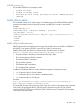
</LOGIN>
</RIBCL>
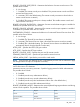
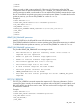
When you send an XML script to update iLO 2 firmware, iLO 2 firmware verifies the TPM
configuration status of option ROM measuring. If it is enabled, iLO 2 firmware returns the same
warning message as stated in web interface. You can add the TPM_ENABLE command to the script
file. HP recommends using XML script syntax to execute firmware updates. To enable the firmware
update to continue, you must set TPM_ENABLE to a value of Y or Yes.
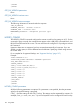
Example 2:
<RIBCL VERSION="2.0">
<LOGIN USER_LOGIN="Administrator" PASSWORD="password">
<RIB_INFO MODE="write">
<TPM_ENABLE ="Yes"/>
<UPDATE_RIB_FIRMWARE IMAGE_LOCATION="C:\xl170\iLO2_170D.bin"/>
</RIB_INFO>
</LOGIN>
</RIBCL>
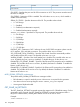
UPDATE_RIB_FIRMWARE parameters
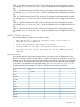
IMAGE_LOCATION is the full path file name of the firmware upgrade file.
TPM_ENABLE enables the firmware to continue updating when option ROM measuring is enabled.
To enable the firmware update to continue, you must set TPM_ENABLE to a value of Y or Yes.
UPDATE_RIB_FIRMWARE runtime errors
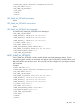
The possible UPDATE_RIB_FIRMWARE error messages include:
• RIB information is open for read-only access. Write access is
required for this operation.
• Unable to open the firmware image update file.
• Unable to read the firmware image update file.
• The firmware upgrade file size is too big.
• The firmware image file is not valid.
• A valid firmware image has not been loaded.
• The flash process could not be started.
• IMAGE_LOCATION must not be blank.
• User does not have correct privilege for action. CONFIG_ILO_PRIV
required.
GET_FW_VERSION
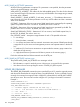
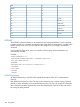
The GET_FW_VERSION command requests the respective iLO 2 firmware information. For this
command to parse correctly, the command must appear within a RIB_INFO command block, and
RIB_INFO MODE must be set to read or write. The user must have the configure iLO 2 privilege
to execute this command.
Example:
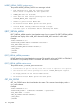
<RIBCL VERSION="2.0">
<LOGIN USER_LOGIN="adminname" PASSWORD="password">
<RIB_INFO MODE="read">
<GET_FW_VERSION/>
</RIB_INFO>
RIB_INFO 105