
HP Integrated Lights-Out 2 Management Processor Scripting and Command Line Resource Guide
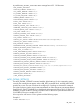
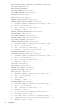
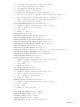
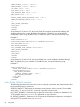
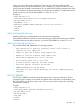

F8_LOGIN_REQUIRED – Determines if login credentials are required to access the RBSU for iLO
2. The possible values are Yes or No.
REMOTE_CONSOLE_PORT_STATUS – Determines the behavior of remote console service. The
possible values include:
• 0 – No change
• 1 – Disabled (The remote console port is disabled. This prevents remote console and Telnet
sessions from being used.)
• 2 – Automatic (This is the default setting. The remote console port remains closed unless a
remote console session is started.)
• 3 – Enabled (The remote console port is always enabled. This enables remote console and
Telnet sessions to be used.)
REMOTE_CONSOLE_ENCRYPTION – determines if remote console data encryption is enabled or
disabled. The possible values are Yes and No.
REMOTE_CONSOLE_ACQUIRE – determines if the remote console acquire operation is enabled
or disabled. The possible values are Yes and No.
PASSTHROUGH_CONFIG – determines the behavior of a Microsoft Terminal Services client. The
possible values are as follows:
• 0 – No change
• 1 – Disabled (The Terminal Services feature is disabled.)
• 2 – Automatic (The Terminal Services client is launched when remote console is started.)
• 3 – Enabled (This is the default setting. The Terminal Services feature is enabled but does not
automatically launch when the Remote Console start.)
HTTPS_PORT – Specifies the HTTPS (SSL) port number.
HTTP_PORT – Specifies the HTTP port number.
REMOTE_CONSOLE_PORT – Specifies the port used for remote console.
TERMINAL_SERVICES_PORT – Specifies the port used for terminal services.
VIRTUAL_MEDIA_PORT – Specifies the port used for virtual media.
NOTE: If port changes are detected, the iLO 2 management processor will be rebooted to apply
the changes after the script has completed successfully.
MIN_PASSWORD – Specifies how many characters are required in all user passwords. The value
can be from zero to 39 characters.
AUTHENTICATION_FAILURE_LOGGING – Specifies logging criteria for failed authentications.
The possible values include:
• 0 – Disabled
• 1 – Enabled (records every authentication failure)
• 2 – Enabled (records every second authentication failure)
• 3 – Enabled (records every third authentication failure: this is the default value.)
• 5 – Enabled (records every fifth authentication failure)
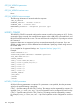
REMOTE_KEYBOARD_MODEL – Determines the remote keyboard language translation used during
remote console operation. The possible values include:
BritishBelgianUS
FrenchFinnishDanish
RIB_INFO 95